
AI email marketing usually breaks down at the exact moment people trust the raw prompt too much. You ask for an email, and the model gives you a flat wall of text on one background, with three stacked buttons and none of the judgment a real send needs.
The value is not the model alone; it’s the scaffolding around it: design rules, brand context, audience intent, and conversion logic. That is what turns fast output into something worth sending, and this piece breaks down the six context layers that make AI useful, where it genuinely helps, and the failure modes that make emails look cheap fast.
What AI email marketing actually means
AI email marketing is the use of AI to plan, write, personalize, and design marketing emails. The output quality depends far more on the context you feed the system than on the model itself. Give AI weak inputs, and it writes generic email faster; give it clear constraints, and it becomes useful.
For a fuller look at what good email systems need, see EmailTemple.
The short answer
AI email marketing is using AI to help produce emails across the full workflow: planning the angle, drafting the copy, shaping personalization, and generating design direction. It can also use campaign data, such as opens, clicks, and customer behavior, to support decisions like message tone, segment fit, and send timing.
The key distinction is simple: AI does not create quality by default. Quality comes from the brand context, design rules, audience data, and conversion logic wrapped around the model.
Raw prompt vs constrained generation
A blank prompt like write me an email usually produces exactly what you would expect: flat copy, weak hierarchy, and button soup stacked onto a generic layout. A constrained generation, built around brand rules, design structure, and a clear conversion doctrine, produces something sharper and more usable, and constrained beats unconstrained every time.
The 6 context layers that make AI email work
If the model starts writing before these layers are defined, the output usually looks generic fast. This is the logic behind how EmailTemple approaches generation: context first, then copy and design.
Layer 1: A design system, not vibes
AI needs layout rules before it needs adjectives. Good email structure is built from zones, hierarchy, and restraint, not from asking the model to make it look nice.
- Use zones with clear jobs, not one long flat stack of sections.
- Keep one primary CTA per zone so the eye knows what to do next.
- Cap brand color to roughly 10 to 15% of the visible surface, and use a simple two-tier type scale.
Layer 2: Conversion doctrine baked in
Every email needs one conversion goal, or the message starts splitting its own attention. The model should know the desired action, where it appears, and how urgency is framed before drafting starts.
- Set one conversion target for the whole email.
- Place the primary CTA above the fold, then repeat it at the close.
- Use honest urgency like Ends Sunday, and add friction-reducer microcopy near the button.
Layer 3: Template archetypes
A welcome email, a receipt, and a sale announcement should not share the same skeleton. Archetypes tell the model what kind of email it is writing before it starts guessing at modules, hero treatment, and CTA style.
- Welcome emails can carry more brand framing and guided next steps.
- Transactional receipts should prioritize trust, clarity, and utility, with no discount-strip behavior forced in.
- Promotional and re-engagement emails need different module counts, CTA strategies, and off-ramp language, especially when making it easy to leave is part of the job.
Layer 4: Brand identity as input
Brand identity cannot be implied and should not be left to memory. Colors, fonts, logos, and legal footer details need to be fed in every time if you want consistent output.
- Pass the approved color palette with usage rules, not just hex codes.
- Include font choices, logo assets, and footer requirements on every run.
- Keep these inputs persistent so each generation starts from the same brand baseline.
Layer 5: Tone of voice presets
Voice gets more reliable when it is preset, not improvised. A defined bank of tones, such as Professional, Luxury, Spartan, or Playful, gives the model a usable frame for headlines, body copy, and CTA wording.
- Use a fixed set of eight tone presets rather than rewriting voice instructions from scratch.
- Apply the preset to headline length, button language, and pacing, not just word choice.
- The first line matters a lot here, because relevance and tone both need to land immediately.
Layer 6: Deliverability guardrails
The email still has to survive the inbox and render properly on mobile. That means the model needs technical constraints, not just creative ones.
- Use mobile-fluid tables and email-safe structure.
- Prefer inline styles and keep the HTML light enough to stay under Gmail’s roughly 102 KB clipping threshold.
- Avoid base64-heavy assets that bloat the file and create rendering risk.
Layer 1: A design system, not vibes
A model given only a marketing goal will usually default to stacked blocks and weak spacing. A model given zone logic, CTA discipline, color limits, and a type hierarchy can produce something far closer to a real send.
Layer 2: Conversion doctrine baked in
This is where most generic AI email falls apart. The copy may sound fine, but if the message asks for two or three actions at once, the whole email gets softer.
Layer 3: Template archetypes
Email type changes structure. A receipt should calm and confirm, a welcome email should orient, and a sale email should drive action without borrowing the same module logic from everything else.
Layer 4: Brand identity as input
This is basic context engineering. If colors, logos, footer rules, and typography are missing, the model fills the gaps with defaults, and defaults are where brand quality goes to die.
Layer 5: Tone of voice presets
Voice instructions work better as reusable presets than as vague prompts like make it sound premium. The tighter the preset, the less cleanup needed in headlines, buttons, and opening lines.
Layer 6: Deliverability guardrails
Pretty output that clips in Gmail or breaks on mobile is still bad output. The model needs email-production constraints up front so the result is usable, not just impressive in a chat window.
Why context beats the model
Every brand now has access to roughly the same AI. That means the model is not the differentiator anymore, the inputs are.

What separates strong output from generic output is the context wrapped around the generation: brand voice rules, words the brand does not use, style guidance, design constraints, offer logic, and audience relevance. Without that, the model fills the gaps with its training defaults, which is why so much AI email ends up sounding and looking identical.
This is also why a mid-tier model with strong context will usually beat a frontier model with none. If the system knows your tone, your layout rules, your CTA logic, your legal footer, and the kind of specificity your audience actually responds to, it has something real to work with.
If it does not, it guesses. That guess is where you get fake personalization, soft claims, generic urgency, and emails that technically function but do nothing for the brand.
AI is stateless by default, so re-briefing every session is a quality problem, not just a workflow problem. Brand rules need to travel with every generation, or the output drifts fast, and if you want the bigger picture on that, our EmailTemple approach is built around context staying attached from the start.
What AI is genuinely good at in email
Speed and a higher quality floor
AI is genuinely good at producing a structurally correct email template in seconds, which raises the quality floor before anyone starts editing. Instead of a blank canvas in Mailchimp or a rushed block stack in ActiveCampaign, you start from a layout with hierarchy, spacing, and a defined CTA path.
Hitting content-density minimums
AI is also useful when a draft feels thin. It can propose plausible secondary modules, such as a short proof block, a supporting benefit row, or a friction-reducer section, so the email stops reading like a headline, one paragraph, and a lonely button.
Adapting one brief across platforms and tones
One good brief can be adapted across Mailchimp, ActiveCampaign, MailerLite, or portable HTML without rebuilding the whole email from zero. The same applies to tone shifts, so a restrained professional version and a sharper promotional version can come from the same source brief instead of restarting the process each time.
Enforcing rules humans forget under deadline
AI is good at consistently checking rule-based details that tired reviewers miss, especially near send time. That includes contrast ratios, CTA hierarchy, footer compliance, and the small structural issues that do not feel strategic but still make the email weaker when they slip through.
What AI gets wrong without guardrails
These are the anti-patterns that show up when AI is asked to make an email without enough structure. The visible issue is usually design or copy, but the real problem is that a missing context layer let the model guess.
| Failure mode | What it looks like | What it costs you | The guardrail that prevents it |
|---|---|---|---|
| Button soup, multiple competing CTAs | Three or four buttons in the same zone, each asking for a different action. | Attention splits, the click path gets muddy, and the email feels pushy instead of clear. | Set one primary CTA per zone and one conversion goal per email (Layer 1 and Layer 2). |
| One flat background, no zones | Everything sits on one uninterrupted surface with no visual breaks between hero, proof, offer, and footer. | Readers scan badly, sections blur together, and the message feels unfinished. | Use a zone-based layout with distinct module jobs instead of one long stack (Layer 1). |
| Weak visual hierarchy | Headline, body copy, button, and support text all fight for the same weight and spacing. | The eye has no obvious reading order, so the CTA loses force even if the offer is fine. | Apply a two-tier type scale, consistent spacing, and defined CTA placement rules (Layer 1 and Layer 2). |
| Generic stock-photo grid | A neat but empty collage of interchangeable images with little connection to the offer or brand. | The email looks templated, trust drops, and the brand starts sounding like everyone else. | Feed brand identity and the correct template archetype in before generation, so visual modules have a real job (Layer 3 and Layer 4). |
| Fake scarcity, Limited time | Urgency language appears with no real endpoint, often as a vague banner or headline claim. | Credibility drops, the copy reads mass-produced, and repeat readers learn to ignore the push. | Use honest urgency with a real condition, such as Ends Sunday, tied to a single offer goal (Layer 2). |
| Headline that just repeats the button label | The headline says Shop now, and the button also says Shop now, with no added reason to care. | You waste the most valuable line in the email and remove the persuasion step before the click. | Use tone presets and conversion doctrine so headlines carry message value and buttons carry action (Layer 2 and Layer 5). |
| Base64-bloated email clipped past Gmail’s roughly 102 KB threshold | The email looks fine in preview, then gets cut off in Gmail because embedded assets made the HTML too heavy. | Readers miss the lower half of the email, including compliance, proof, or the closing CTA. | Keep HTML light, use inline styles, and avoid base64-heavy assets (Layer 6). |
How to choose your AI email approach
Pick the setup that matches how often you send and how much brand risk you can tolerate.
Raw LLM for one-offs
A raw LLM like ChatGPT or Claude is fine for occasional one-off emails when speed matters more than consistency. The trade-off is that you have to supply the design system, conversion goal, template type, brand inputs, tone rules, and deliverability constraints yourself every single time, and most people do not keep that standard up for long.
Generic ESP AI features
Generic ESP AI features are useful in narrower ways, especially for subject line ideas, send-time suggestions, segmentation help, and basic draft generation. The problem is that they often still leave you inside the same default template system, so the copy may improve a bit while the email still looks cheap in Mailchimp, ActiveCampaign, or MailerLite.
A studio with context built in
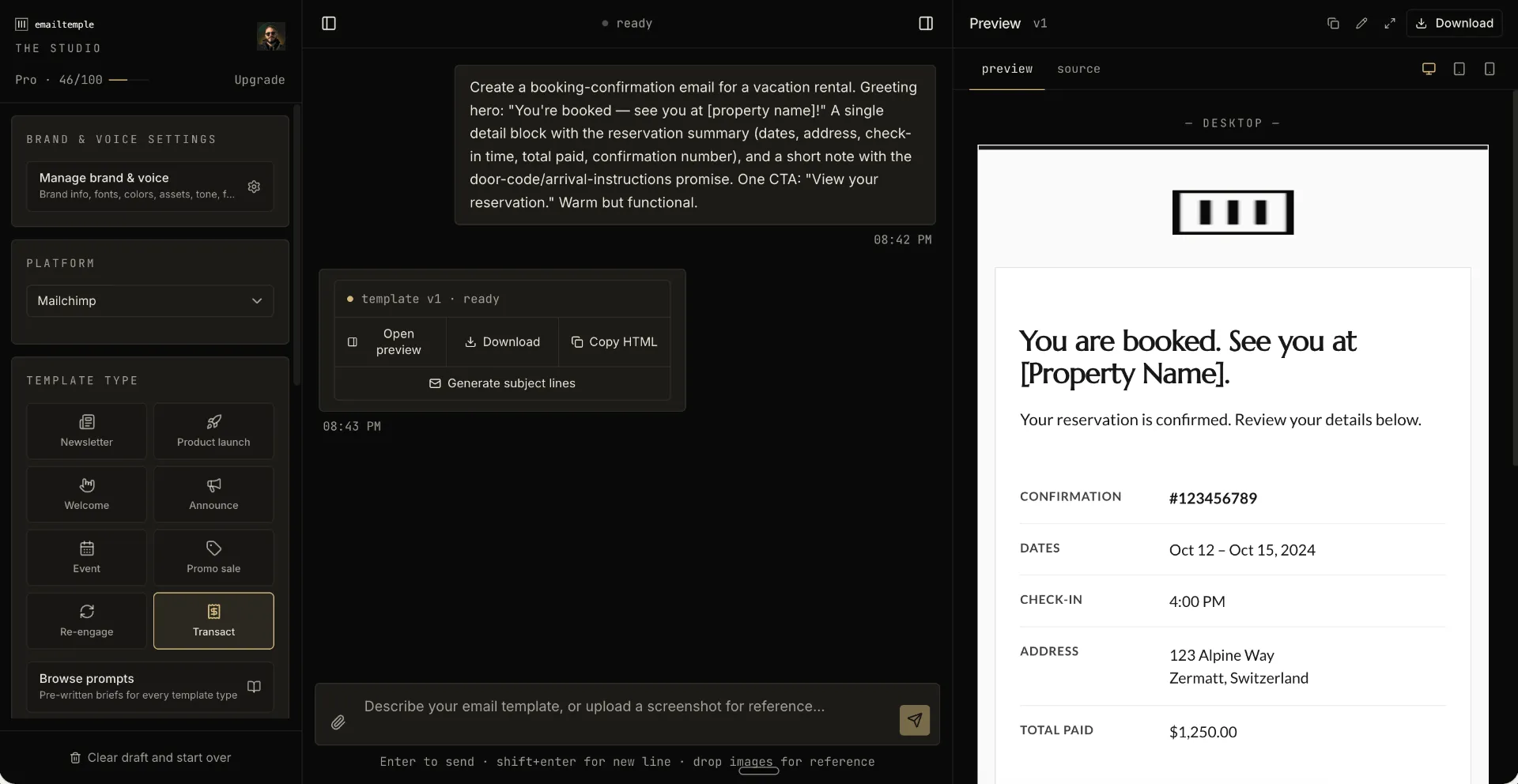
A studio with context built in makes more sense when you already have a list and are not sending enough because the production layer is the bottleneck, not the ideas. This approach bakes in the design system, brand rules, conversion logic, and deliverability guardrails from the start, then exports the finished email to your ESP, which is why EmailTemple fits operators who want production-ready sends without drag-and-drop, template browsing, or rebuilding the brief every time.
Putting it into practice
AI raises the floor only when the output is constrained by the six layers behind it. If you already have a list but rarely send, fix the template problem first, because more volume sent through weak structure just gives you generic email faster.
If your ESP’s default templates make your sends look cheap, the practical next step is simple: describe what you want to send and get a branded template back. For the full guide, see our EmailTemple, or if you are ready to try it, Generate your branded template for free.
Frequently asked questions
What is AI email marketing?
AI email marketing is the use of AI to help plan, write, personalize, and sometimes design marketing emails. It can also use data like opens, clicks, and customer behavior to support decisions such as send timing, segmentation, and message tone.
Can AI write a whole marketing email by itself?
Yes, AI can draft a complete marketing email by itself, including the headline, body copy, CTA, and basic structure. What it usually cannot do well on its own is make that email feel truly on-brand, visually considered, and distinct without strong context.
Why do AI-generated emails all look the same?
AI-generated emails look the same when the model is missing context. If you do not feed in a design system, brand rules, template type, and tone guidance, the model fills the gaps with generic defaults.
Does AI email marketing hurt deliverability?
AI email marketing does not automatically hurt deliverability, but sloppy output can create problems. Common risks include bloated code, base64-heavy emails, unsupported style handling, and messages that get clipped when Gmail cuts emails around the 102 KB mark.
Is there a free way to try AI email marketing?
Yes, there are free entry points, including raw LLMs and the built-in AI features inside many ESPs. The trade-off is that you still have to supply most of the structure, brand rules, and design logic yourself.
Do I still need to know design to use AI for email?
Not always. If the AI workflow is context-driven and already enforces layout rules, CTA hierarchy, contrast, and email-safe structure, you do not need to be a designer to get a solid result.
