
Introduction
If you’re looking for how to improve email deliverability, start with diagnosis rather than repair. The same symptom — fewer emails reaching the inbox — comes from two separate problems: a gradual list and engagement decline, or a technical change to SPF, DKIM or DMARC. They need opposite fixes.
A slow slide across campaigns points to list quality and sender reputation. A sudden drop right after changing your sending domain, from-address or ESP points to authentication. If you haven’t separated those two yet, start with why are my emails going to spam, then come back here for the repair.
The Fastest Path Back to the Inbox Is a Staged Re-Warm
Most guides publish a flat checklist. The sequence is the mechanism: you earn trust back in layers, widening only while the numbers hold.
- Weeks 1–2 — send only to contacts who opened or clicked in the last 30 days. This is the smallest, warmest segment you have, and it gives the cleanest read on whether sending can scale safely. Starting wider to recover volume faster blurs the diagnosis.
- Weeks 3–4 — widen one tier at a time, to 60 days, then 90. Recency is the cleanest rule for deciding what sends next. Keep the jumps small enough that each stage can be judged on its own.
- Read the numbers after every stage, not after the campaign. Complaint rate first, then bounce rate. If opens hold but complaints rise, the problem is permission quality inside the segment you just added.
- Stop widening the moment complaints rise or bounces jump. Hold, or step back to the last clean tier. Pushing past that point turns a recoverable reputation problem into a much longer repair.
From week 5, resume broader sending only while placement holds. Two groups stay out of the repair phase entirely: contacts inactive for six months or more, who need a separate re-engagement pass, and brand-new subscribers you have no engagement data on yet.
One caveat on measurement: Apple Mail Privacy Protection inflates opens, so lead with clicks and complaint patterns and treat opens as directional context.
Moving ESP or Sending Domain Is a Separate Job
This is the conflation that costs people their sender reputation twice. Reputation repair wins back trust on an existing setup after weak engagement or list-quality damage. Domain warming introduces a new sending identity so providers can build confidence in it from zero. Different problems, different work.
Change ESP, sending domain or subdomain and warming becomes mandatory even when authentication passes and the list is healthy. Providers see a setup with no history to trust. Warm in stages — campaign one to contacts active in the last 7 days, campaign two to the last 14, campaign three to the last 21 — widening only while performance holds.
Carry the suppression list across before anything else. If the old platform already knows which addresses bounced, unsubscribed or complained, mailing them from the new ESP is the fastest way to damage the new reputation. A new domain needs clean history more than it needs volume.
Authentication Is the Email Deliverability Floor
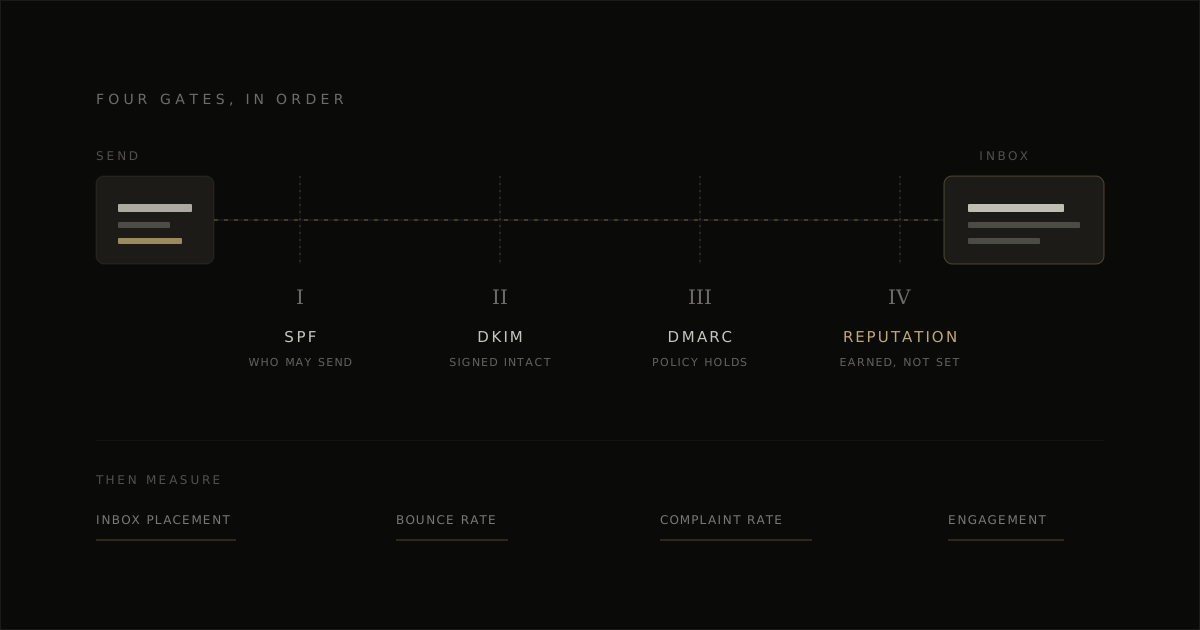
Clear the floor before any repair can hold. SPF authorises the sending system, DKIM signs the message so the receiver can verify it wasn’t altered, and DMARC tells providers how to judge alignment. The visible From domain has to match the identity those checks support — alignment is where this usually breaks. Gmail and Yahoo now treat that, plus a working one-click unsubscribe, clear sender identification and low complaint rates, as requirements for bulk senders rather than suggestions.
Passing authentication is still not the same as earning placement. Outlook can junk the exact campaign Gmail accepts, and the cause is often reputation contamination from outside the marketing program — old VPS tooling, server reports or a leftover SMTP setup sending on the same domain. Diagnose by provider, not by averages.
Ongoing Hygiene That Keeps You in the Inbox
Once repair works, the job changes. Send by engagement recency rather than a full-list calendar: most often to recent engagers, less often to older ones, and stop regular campaigns to contacts dormant six months or more. A steady cadence beats quiet weeks punctuated by sudden large sends — the pattern itself works against you even when the content is fine, and segmentation is the practical mechanism well below 1,000 subscribers.
Keep replies on and monitored. A reply-enabled from-address is deliverability hygiene, not customer service, and confused replies are early warning before harder spam signals accumulate. Remove hard bounces immediately.
Never buy, rent or scrape a list — those contacts bring outdated addresses, recycled inboxes and spam traps. If you’ve cleaned the list, matched frequency to engagement and held a steady pattern for a month with no improvement, the problem is deeper than hygiene.
Where Template Design Fits, and Where It Does Not
Template design sits on the content side only. It will not authenticate a domain, warm an IP, clean a list or repair reputation. What it protects is what readers actually receive: HTML under roughly 80KB, live text instead of copy baked into images, descriptive alt text, a visible unsubscribe row, and rendering that holds in dark mode and Outlook. Image-only emails and code heavy enough to risk Gmail clipping near 102KB drag engagement down, which feeds straight back into placement. To tighten that part, generate your branded template for free.
Frequently Asked Questions
What is a good email deliverability rate?
95% or higher for inbox placement. Sustained performance below 90% points to a real problem, not normal fluctuation. Watch complaint rate alongside it and keep it under 0.1%.
How long does domain warming take after switching ESP?
Weeks, not days, and longer if sending history is weak or volume ramps too fast. A provider switch does not reset trust — warming a new domain is separate work from fixing the reason placement fell.
My SPF, DKIM and DMARC all pass but placement is still bad. Why?
Authentication proves identity, not trust. Providers still decide placement on reputation, engagement, list quality and complaint rates, so the cause is usually behavioral: stale segments, over-broad sends, or a sender history that hasn’t recovered.
