
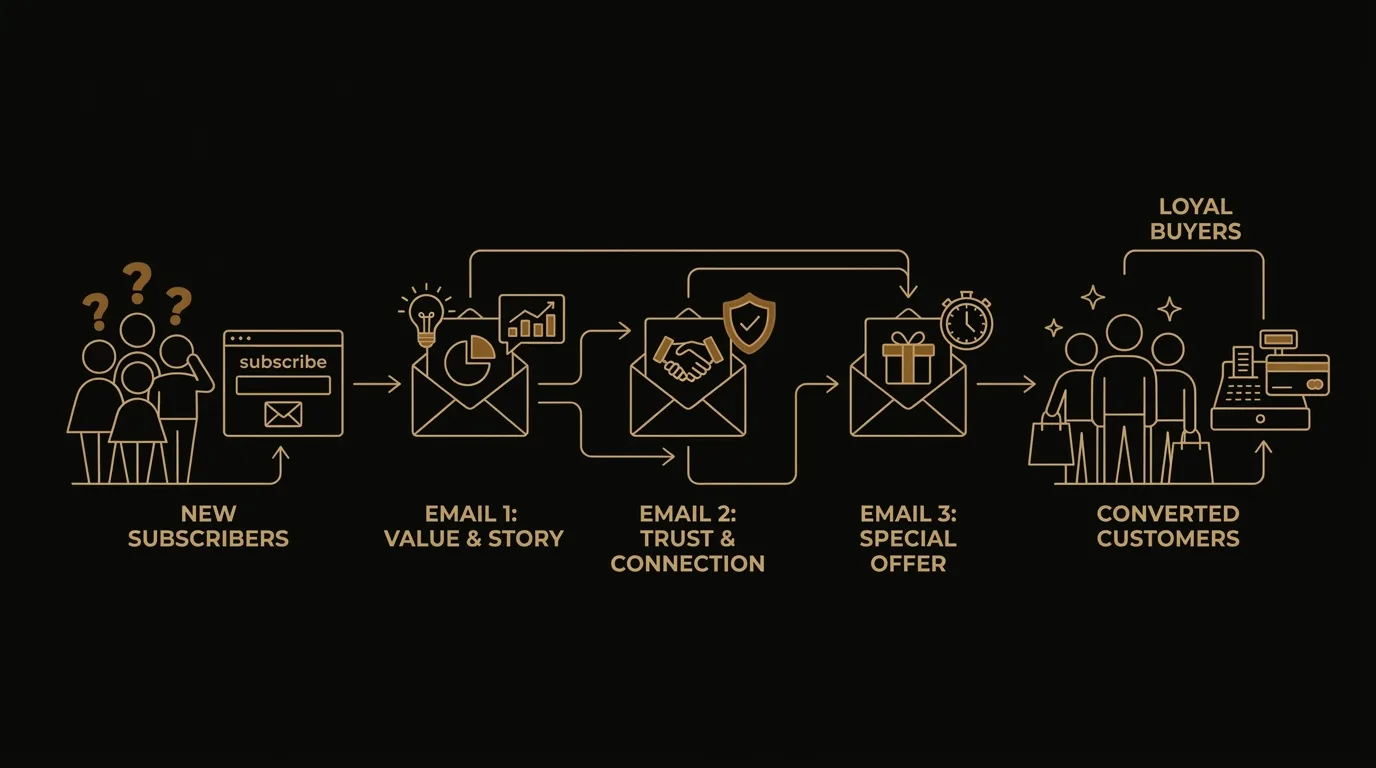
Your list is warm. Nobody’s job is to email it.
You run a small business; you have a list of people who asked to hear from you, and a welcome email sequence for small business owners is the fix you keep meaning to build. The list sits there. The few sends that do go out come in your ESP’s default template, look like every other email in the inbox that day, and make the next send feel even less worth doing.
We built EmailTemple around that pattern: the offer is fine, the list is real, and nobody’s job is to email it. EmailTemple generates a ready-to-send welcome email sequence and exports it to your ESP in one click. This page walks through the email-by-email structure, real welcome emails worth borrowing, and what to cut so new subscribers get a first handshake worth opening.
What a welcome sequence is, and why one send won’t do it
A welcome email sequence for a small business is a short automated series, usually four or five emails over the first week, that introduces you, builds trust, and moves a new subscriber toward one next step. Each email sends on its own timer after signup, so the new reader hears from you without anyone pressing send.
Here is the map, with the detail for each email left to a later section:
- Day 0, the welcome: confirms the signup, sets expectations, and delivers whatever was promised.
- Day 1 or 2, the problem: names the situation your subscriber is in and why it matters.
- Day 3, the story or the reason: shows why you do this work and why they can believe you.
- Day 4 or 5, the proof: the benefits and results, in concrete terms.
- Day 6 or 7, the offer: the single action you want them to take.
The timings are a starting shape, and you can compress or stretch them to fit your offer.
One email hits a ceiling. It reaches only the share of your list that opens it, and most of those readers will not remember it a week later. A welcome series fixes that by giving the same offer several chances to be seen, each from a different angle: a different story, a different reason, one action throughout.
That is the difference between more emails and more surface area. A single send says the offer once and moves on; a sequence says it five ways, so the subscriber who missed email one can still land on email three. The Sequence Builder produces this structure in one pass, keeping one voice across the flow while each email takes its own angle.
Who this sequence is for
This sequence suits an operator with a list that already exists, signups still arriving, and nobody who owns email. Four profiles show where it fits.
You have a list and signups keep coming
New subscribers join every week and hear nothing back. A welcome sequence puts those first days to work.
Nobody owns email
Email has no calendar, no flow and no hour in your week. We built this so one sitting produces something that runs without you.
You are weighing a tool against a retainer
An agency quote can cost more than a part-time hire. A tool covers the same first job at a fraction of that.
You need more than a one-off designed send
One designed email is a start. Your business needs a connected series that introduces you, builds trust and asks for one next step.
If you have no list yet, start with a signup form and a reason to join; the sequence picks up once the first subscribers arrive. If a dedicated email manager already runs your flows, your program is ahead of what this article covers.
For a small business owner, the honest test is simple: do people ask to hear from you, and does nobody follow up? If yes, the rest of this article is built for you, and the next section lays out what each email should do.
What each email should do, in order
Five emails, each with one job and one button, cover the first week. Here is the order I use, with timing and the single action each one points to.
Email 1: the handshake, sent immediately
This email delivers what they signed up for and introduces you in a few warm, first-person sentences. It sends the moment they subscribe, while your name is still fresh. The one CTA is the thing they asked for: the download, the code, or the first thing worth reading. Keep the hero small, add a founder note and a short getting-started grid, and leave the selling for later. Your welcome email templates follow this same shape.
Email 2: the one that earns the next open
This is where the money starts, because it gives people a reason to open your next email. It sends one day after the first, and its job is to give them something useful with no pitch attached: a story of why you started, a tip they can use today, or the answer to the question every new customer asks. The CTA is a single read-or-reply action, such as reading the full piece or hitting reply with a question. A subject line that is specific and a little curious does the rest.
Email 3: proof it works for someone like them
This email shows a customer result, a testimonial, or a before and after, so the value of what you sell becomes visible. It sends around day three, once they know who you are. Choose a person who looks like your typical buyer and be specific about what changed for them. The CTA is one step toward the offer, such as seeing that customer’s full story or browsing the product they used.
Email 4: the offer, with an honest reason to act
Here the first real ask arrives, and it carries a reason that is true: a seasonal window, a limited batch you actually produce, or a welcome price you really do offer. It sends around day five. State the offer plainly, name what it costs and what they get, and skip the countdown language. The CTA is one button that points at the purchase, booking, or sign-up you decided this sequence exists to drive, and the email closes on that same button.
Email 5: one nudge, then let them breathe
A single follow-up goes to people who did not act on the offer. It sends two days after Email 4 and works best short: remind them what is on the table, answer the most common hesitation, and repeat the same CTA. After this email, the sequence ends and subscribers move to your regular sends. One nudge respects their inbox, and it keeps the goodwill the first four emails earned.
Real welcome emails worth borrowing
Six senders show how a first email does one job well: Casper, Brooklinen, Glossier, hims, Slack and Clay. Each of these welcome email examples comes from a different kind of business, and each has one structural move you can copy into your own sequence this week.
The table pairs what each email does well with the single move worth taking. For copy-ready starting points, the page Free welcome email templates, that earn the open covers the writing side. The moves below cover the structure.
| Sender | What the email does well | The one move to steal |
|---|---|---|
| Casper | Clean single-column layout, one greeting, one CTA; press logos carry the proof | Treat the first email as orientation: one idea, one action |
| Brooklinen | Pairs an instant welcome offer with a short block of brand promises | Lead with the incentive, then back it with promises that lower purchase risk |
| Glossier | Introduces the team and the product, then ends on customer photos | Close on the customer’s voice so the email reads less like a pitch |
| hims | Short, skimmable copy with the app shown on a phone in the hero | Show the product in use and make the single CTA the install |
| Slack | Hero echoes the subject line; getting-started tips as scannable bullets | Make the hero pay off the subject line’s promise |
| Clay | Six emails numbered (1/6) to (6/6), one activation step each | Number the series and end each email by previewing the next |
Two patterns repeat across the set. Every email points to one primary action, and each one carries a single piece of proof: logos, promises, customer photos or the product itself. That is a sound limit for a small brand to adopt, because a lone operator has no time to maintain a five-offer layout.
If you sell physical goods, start with Brooklinen’s order of incentive first, reassurance second. If the product is software or an app, Slack, hims and Clay show the product early and keep the action count low.
How many emails, how often, and what to cut
Four or five emails over the first week is the right size for a small business, and the real risk is building more than you will ever maintain. A welcome email series that ships and stays current beats a twelve-email arc that goes stale by spring.
Spacing follows the same logic. Send the first email immediately, then give each next email a day or two of room. Keep a hard ceiling on automated sends: one builder I’ve seen capped it at one automated email per user per week across all flows, and that single rule kept unsubscribes low while several flows ran side by side. Your welcome series sits on top of that cap, so count every other automation before you add a sixth message.
Cut design before you cut copy. Clean copy with one clear CTA is often enough, and a plain, on-brand email with a sharp line and one button can perform well without elaborate polish. When you have an hour to spare, spend it on the offer, not on a fancier layout.
Cut the generic series too. Ask one question at signup, such as why the person joined, and let the answer shape which email 2 and email 3 they get. A single series for everyone wastes the one piece of intent you collected for free.
Treat subject line and hero as one unit. The hero should echo the promise the subject line made, because a mismatch between the inbox and the opened email sends people straight back. For wording options, see welcome email subject lines sorted by use case; every welcome email subject line there is written to pair with a matching first screen.
Frequency is a guardrail, not a growth lever. Send most often to the most recently engaged, less often to the quieter ones, and stop sending to anyone disengaged for six months or more, outside a re-engagement campaign. Keep a from-address that accepts replies, because replies are a positive signal to inbox providers and a no-reply address throws it away. Remove hard bounces right away, and never buy or rent a list. Purchased lists bring outdated addresses and spam traps, and they break Mailchimp’s Terms of Use.
These welcome email best practices hold up because they cost nothing to maintain. Build the smallest sequence you will keep current, then open the numbers after a month and change one thing.
Generate the whole flow, then export it to your ESP
EmailTemple’s Sequence Builder generates a complete welcome flow in a single pass, from one brand context and a short brief per email, and exports it to your ESP in one click. The studio handles production, so the next email in your welcome series costs one generation instead of a designer’s week.
One pass, whole flow
A planner pre-pass decides the arc, then every email is generated in parallel so the set reads in one voice.
Pro workspace at /sequence, with a welcome series preset.
One-click export
Send the flow to Mailchimp, ActiveCampaign, MailerLite or Klaviyo, or download every email as a zip.
Universal mode gives portable HTML for other ESPs.
Dark-mode safe, ready to send
Each email is production-ready and renders correctly in dark-mode clients like Gmail iOS and Apple Mail.
Klaviyo drafts, never sent
Link your Klaviyo account and push templates, draft campaigns or a full automation flow. Nothing is sent from the studio.
The studio makes the cadence survivable. Your brand kit keeps a higher send rhythm from looking rushed, and the cost of each added email stays at one generation. The frequency, the segments and the send itself stay with you and your ESP, so decide the cadence first using the previous section, then generate against it.
Before you build, run the welcome sequence generator checklist: your offer, your one next step per email, and your brand colors, fonts and logo saved in the brand kit. With those in hand, the first draft of your email marketing flow arrives in seconds, ready for your edit.
Common questions about welcome sequences
How many emails should a welcome sequence have?
Four to five emails is a sound default for a small business, and the right number scales with your purchase cycle. A low-priced product that sells on a first visit needs fewer emails; a considered purchase gives you room for more. Some senders run five to ten, but a shorter set you keep current beats a long one you abandon. If you are deciding how many welcome emails to send, start at four and add one only when you have a distinct job for it.
How far apart should welcome emails be sent?
About a day apart during the first week. The first email goes out immediately, and the rest follow while the signup is still fresh in the subscriber’s mind. If your product needs time to be tried or considered, widen the gap for the later emails, and keep the opening ones tight.
What should the first welcome email say?
It delivers what the signup promised and tells people what to expect next. If they signed up for a discount, a guide or a newsletter, put it at the top. Then say how often you will write and what the emails will cover, with one clear button for the next step.
Do I need different sequences for different signup sources?
Yes, when the intent behind the signup differs. Someone who downloaded a guide and someone who bought a product are asking for different things, so each gets a different opening and a different offer. You do not need separate flows to start: launch one sequence, then split it once you can see which sources behave differently.
Can I write a welcome sequence with AI without it sounding generic?
Yes, and the brief decides the result more than the model does. Generic output comes from generic input, so give the studio your offer, your audience, the voice you use and the one action each email points to. With that context, a Sequence Builder run generates the whole flow together, so the set reads as one voice rather than separate emails. Then export it to your ESP, which handles the sending.
What is the difference between a welcome email and a welcome sequence?
A welcome email is a single send; a welcome sequence is a connected series of emails, each with its own job. The single email delivers the promise and says hello. The sequence carries the subscriber on from there, building trust over the first week and moving toward one offer.
Build your welcome sequence in one sitting
You have the order, the timing and the one job for each email. The remaining work is production, and the studio handles it: describe the flow once and the whole welcome email sequence comes back ready to send.
A welcome sequence your list actually opens, built in one sitting
- Whole flow generated in one pass
- Exported to your ESP in one click
- Dark-mode safe and ready to send
Free tier: 3 generations a month, no card.
