
Monday morning usually looks the same: your list is there, your ESP is open and the cursor is blinking, but you still have no idea what to send. That is the real shape of what to send when you have nothing to say, not a lack of content in the abstract, but the moment where sending feels heavier than skipping. Most newsletters do not die because the audience disappeared. They die because this decision point keeps showing up, and eventually the operator stops opening the draft.
The fix is not another bank of monthly themes or filler prompts. This is an editorial system problem, which means the job is to build a repeatable way to find, shape and send useful emails even on low-idea weeks. The rest of this playbook breaks that into four moves: simple frameworks for turning ordinary updates into sends, ways to repurpose work you already did, lightweight forum research to surface live questions and clear rules for when skipping a send is the right call.
The Quick Answer: What to Send This Week
If you need to send something this week, pick the simplest email that matches what you already have: a question, an old winner, a changed opinion or a short curation.
The 4 fallback sends that always work
Use one of these when the draft is blank and time is tight.
- Answer a real question your audience asked this week, and use this in the subject line slot: the question itself.
- Repurpose a high-performing past send with a new angle, and use this in the subject line slot: same topic, new context.
- Share one thing you changed your mind about, and use this in the subject line slot: I changed my mind about [topic].
- Curate 3 things worth their attention, and use this in the subject line slot: 3 things worth your attention this week.
Generate high-converting newsletter templates in the EmailTemple studio.
How to pick between them in under 5 minutes
- If your energy is low, send the curated 3-item email.
- If you have 15 minutes or less, answer one real question and stop there.
- If your last send performed well, reuse that topic with a different angle.
- If there is a clear question sitting in your inbox, pick that before anything else.
- If you have a strong opinion or reversal, write the changed-my-mind email.
Why ‘What Do I Send This Week’ Kills More Newsletters Than the Algorithm
The decision-fatigue death spiral
This is the loop: you open your ESP, stare at a blank draft, decide nothing feels strong enough, then close the tab and tell yourself you’ll send tomorrow. Tomorrow becomes later in the week, and later in the week becomes next Monday with the same blank page waiting for you. The problem is not laziness. It is repeated editorial decision-making with no system underneath it.
The skipped-week compounding cost
A skipped week is not neutral. Every missed send makes the next one colder, because the list has had more time to forget your rhythm, your voice and why they stayed subscribed in the first place. A list that hears from you once every five weeks usually performs worse per send than one that hears from you every week, even when the weekly emails are less original. Irregular sending also makes the next campaign carry too much weight, which is why the unsubscribe spike often comes right after a long gap.
Why fresh ideas is the wrong frame
Most operators look for ideas when they should be building an editorial system. The people who send consistently are usually not more creative on demand, they just have repeatable ways to turn questions, opinions, customer language, past sends and light research into something sendable. That matters because willpower is a bad production process. If you want consistency, build a repeatable editorial workflow that gives you a draft path before you open the ESP.
The 5 Editorial Frameworks That Survive Bad Weeks and Busy Weeks
These five frameworks give you containers, not inspiration theater. When the week is messy, the point is to fit real material into a structure that can be written and sent.

The one question
Answer one real reader or customer question in a tight email that gets to the point fast.
- Open with the exact question, or a plain version of it.
- Body: give the answer in a few steps, examples or distinctions.
- Close with the next action, mistake to avoid, or one follow-up thought.
The behind-the-scenes decision
Narrate one decision you made this week and explain why you made it that way.
- Open with the decision itself, not the backstory.
- Body: explain the options you considered and the tradeoff that mattered.
- Close with the principle other operators can reuse.
The strong opinion + one counter
State a clear take, then give the strongest reasonable case against it before landing your view.
- Open with the opinion in one line.
- Body: present the best counterargument without mocking it.
- Close with why you still land where you land, and in what cases the counter wins.
The curated 3
Share three links, observations or examples, each with one useful line of commentary.
- Open with the theme connecting the three items.
- Body: list each item with one short note on why it matters.
- Close with the pattern tying them together, or the one item worth acting on first.
The reframe of a common belief
Take a common belief in your niche, flip the frame and explain what changes if your version is true.
- Open with the standard belief your audience already knows.
- Body: flip it, then explain why the old frame misses the real issue.
- Close with the practical implication, what to do differently this week.
Framework 1: The One Question
This works because the blank page disappears the moment you borrow language from a real person. The email already has a job: answer the thing they asked.
Framework 2: The Behind-the-Scenes Decision
This is useful when the week produced work but not a polished lesson. A decision, plus the tradeoff behind it, is already enough material for a send.
Framework 3: The Strong Opinion + One Counter
This format keeps opinionated emails from turning flat or smug. The counter gives the piece tension, and it also makes your final position more credible.
Framework 4: The Curated 3
Use this when your brain is tired but your attention is still working. You do not need a full thesis, only a clear theme and three short notes that help the reader filter the noise.
Framework 5: The Reframe of a Common Belief
A reframe is strong because it changes how the reader sees an old problem. If the flip is real, the email feels fresh without needing fresh source material.
The Repurposing Playbook: Mine What You’ve Already Written

The 4 sources most operators ignore
- Old emails from your own sent folder: these usually contain language you wrote fast because it was already true.
- Past newsletters that got above-average opens or replies: these show where your audience already leaned in.
- Social posts that got real comments, not just likes: comments usually mean the idea had enough tension to make people respond.
- DMs and support replies that took you more than 2 minutes to write: if you had to think to answer it once, there is probably a newsletter in it.
The angle shift, not the copy-paste
Repurposing is not lifting an old send and changing a few words. It is finding the line, claim or observation that still holds up, then asking what the next layer is.
Sometimes that means asking what changed since you wrote it. Sometimes it means asking who the advice is not for, what the tradeoff is or what part readers usually get wrong when they try to apply it.
That is why reused material does not have to feel stale. The source gives you the starting point, but the new angle gives the send its reason to exist now.
A 15-minute repurposing routine
- Open your old sent folder and scan the subject lines.
- Find one line in an old email that still feels true today.
- Screenshot that line so you stop browsing and start working.
- Ask, what changed since I wrote this?
- Write the new send around that one line, not around the whole old email.
Forum Research: Where Real Topic Ideas Actually Live
Why Reddit and niche forums beat AI for topic ideas
AI can give you polished variations of what is already common. A real person asking a real question in a niche forum gives you something better: language, stakes and demand in the same place. That is why forum research is so useful for newsletter operators. The topic arrives pre-validated because somebody already cared enough to post it. Once you have the topic, how to use AI for email marketing covers turning it into a branded send.
How to find the right subreddits for your audience
Search by your customer’s job title, workflow or frustration, not by your own service category. If you sell email strategy, look for where operators talk about retention, store growth, deliverability or list fatigue, not just where marketers discuss newsletters. Good starting clusters include: SEO services: r/SEO, r/WebsiteSEO, r/seogrowth; e-commerce: r/ecommerce, r/shopify; B2B SaaS: r/SaaS, r/startups; freelancers and consultants: r/freelance, r/Entrepreneur; small business: r/smallbusiness, r/Business_Ideas. The point is to get closer to buyer language, not peer language.
The 4 post types worth saving
- How do I questions with heavy discussion: these usually reveal a recurring problem with obvious newsletter potential.
- Rants about a tool or process: frustration exposes gaps, tradeoffs and opinion angles.
- Is anyone else seeing X threads: these are useful because they surface live pattern changes early.
- Buying-decision threads: these show what people compare, fear and misunderstand before they choose.
Building a long-term topic database in a Google Sheet
Keep a simple Google Sheet with these columns: Date, Source URL, Question or Quote, Audience Segment, Framework Fit, Status. Add rows as you browse, then tag each one to a framework like one question, curated 3, reframe or strong opinion so it is ready when you need a send. Over time, this becomes a working editorial asset that can feed newsletters and social content without restarting from zero each week.
Pro tip: a year of this kind of capture can give you 200+ pre-validated topics.
Founder-as-Narrator: The Style That Carries a Boring Week
What founder-as-narrator actually means
Founder-as-narrator means you are the person moving through the week, making decisions, noticing tradeoffs and reporting back on what happened. The reader is not there for a polished speech. They are there to watch an operator think in public. This is not thought leadership. It is documentation with a point.
The 3 moves that make a quiet week interesting
- Name the specific decision you wrestled with: pick the one choice that actually mattered, even if it felt small from the inside.
- Show your math: include the numbers, costs, constraints or tradeoffs that made the decision real.
- End on the next thing you’re testing: close with what happens next so the email feels like a live dispatch, not a completed lecture.
When this style backfires
It stops working when the founder turns into the hero instead of the camera. If there is no real decision, no tradeoff or no unresolved next step, the email usually collapses into self-reporting with no value for the reader. The other failure mode is turning it into a diary. A good dispatch keeps the focus on what the week teaches, not on proving the founder is interesting.
Examples From Operators Who Send Through Every Kind of Week
These three patterns show that consistency usually comes from a repeatable format, not a constant stream of new ideas. Pick the archetype closest to your working style, then copy the operating pattern rather than the exact topic mix.
| Operator Archetype | What They Send | Where Topics Come From | Time to Write | What They Do on a Bad Week |
|---|---|---|---|---|
| B2B founder | Weekly one-question email | Sales calls, support tickets | About 45 minutes | Re-answer an old question, new context |
| E-commerce operator | Product story, customer story, curated 3, BTS | Shopify reviews, support inbox | About 30 minutes | Defaults to the curated 3 |
| Solo creator | Weekly essay-style send | Old emails, saved Reddit threads | About 60 minutes | Repurposes one past paragraph |
The B2B founder who built a ‘one question’ weekly
This pattern works because the topic sourcing is built into the week. Every sales call and support exchange can become the next send.
The e-commerce operator running on a 4-framework rotation
Rotation lowers decision fatigue. Instead of asking what to write, the operator asks which slot this week belongs to.
The solo creator who repurposes from their own sent folder
This is usually the highest-effort format, but it becomes manageable when the creator treats old sends as raw material. The archive does part of the work before the writing starts.
When to Skip a Send Entirely (and How to Skip Without Penalty)
The 3 conditions that justify a skip
- You have nothing to say and every framework feels forced: a weak send written out of obligation usually does more harm than a clean skip.
- You are sending from a bad emotional place: if the draft reads bitter, reactive or resentful, do not ship it.
- Your last two sends underperformed: stop and diagnose before sending a third email into the same problem.
The 2-line holding send that beats silence
If you need to skip, send a short holding email instead of disappearing. Line one: say you are taking this week off and link to one useful past resource. Line two: tell them what to expect next week. This is better than radio silence because it keeps your inbox placement warm and preserves the habit of hearing from you.
How to skip without training your list to ignore you
An occasional skip is fine. A repeated skip pattern is usually a cadence problem, not a discipline problem. If you are missing more than one send a quarter, lower the promised frequency and keep it. A dependable every-other-week schedule will usually perform better than a weekly promise you keep breaking. For the full picture on setting that number, see the best practices for email marketing frequency.
Your 4-Week System: From ‘What Do I Send’ to ‘Which One First’
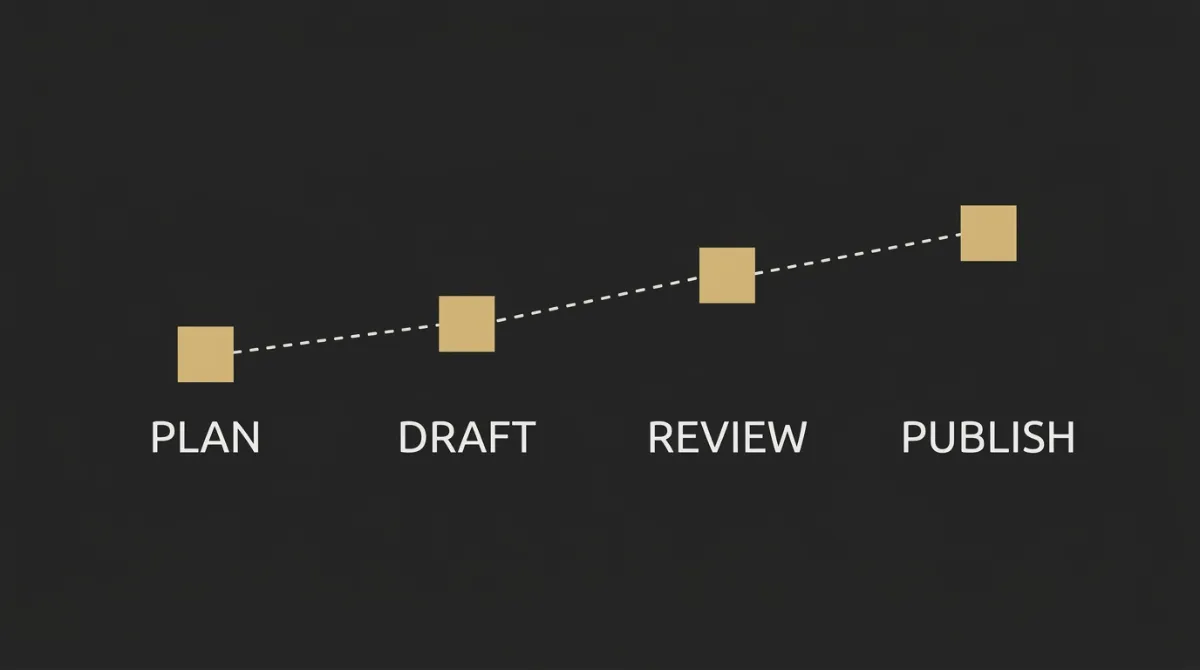
This is the point where newsletter consistency stops being a motivation problem and becomes a working system. Four weeks is enough to build the inputs, choose the formats, mine your archive and set a cadence you can actually keep.
Week 1: build the topic database
By end of this week you will have a working topic sheet with your first saved ideas.
- Create the Google Sheet with Date, Source URL, Question or Quote, Audience Segment, Framework Fit, Status.
- Pick 3 subreddits or forums your audience actually reads.
- Save 10 posts or threads into the sheet.
Week 2: pick your 3 default frameworks
By end of this week you will have three editorial containers matched to your energy and audience.
- Review the 5 frameworks and shortlist the 3 you could repeat without force.
- Match each framework to one common audience question or content need.
- Write the name of each framework at the top of your planning doc or sheet.
Week 3: run a repurposing audit on your last 12 sends
By end of this week you will have a shortlist of proven lines and angles worth reusing.
- Open your last 12 emails and mark the ones that got real replies.
- Pull out the standout lines, claims or questions from those sends.
- Save those lines into your topic sheet with a framework fit.
Week 4: set the cadence you can actually hold
By end of this week you will have a real publishing rhythm and a fallback protocol.
- Choose one cadence: weekly, bi-weekly or monthly.
- Write that cadence on your calendar for the next cycle.
- Draft your 2-line holding send template in advance.
Week 1: Build the topic database
The goal is not volume yet. The goal is to prove you can collect better raw material than your own blank page gives you.
Week 2: Pick your 3 default frameworks
Three is enough. More than that usually creates choice overload instead of flexibility.
Week 3: Run a repurposing audit on your last 12 sends
Your archive is already telling you what deserves a second pass. Look for replies first, because replies usually signal relevance more clearly than vanity metrics.
Week 4: Set the cadence you can actually hold
Pick the rhythm you can keep on a normal month, not an unusually calm one.
Conclusion: A Newsletter That Survives You Having a Bad Week
The operators who send through every kind of week are usually not more creative than everyone else. They have frameworks, a repurposing habit, a topic database and permission to skip when forcing a send would make it worse.
Once that editorial system is in place, the next thing holding sends back is usually the container. Default ESP templates can make solid thinking look cheap, which is exactly the gap EmailTemple is built to close: production-ready, dark-mode-safe templates in seconds, exported to Mailchimp, ActiveCampaign or MailerLite. If you are weighing it against other builders, the 6 best Stripo alternatives lays the options out side by side. Or if you just want to ship now, you can generate your own branded newsletter template in the EmailTemple studio for free.
Frequently Asked Questions
How often should I send a newsletter if I keep running out of ideas?
You should send at the cadence you can sustain on a bad week, not your best one. Weekly is fine if you have frameworks, a topic database and a repurposing habit. Bi-weekly is more honest if you do not.
The mistake is promising a frequency that only works when you have extra time and energy. A steady rhythm your readers can trust is usually better than an ambitious one you keep breaking.
Is it better to skip a week or send something mediocre?
It is better to skip with a short holding send than to send something weak, bitter or empty. A mediocre send can train people to ignore you, which is harder to recover from than one planned pause.
If you do skip, tell readers you are taking the week, point them to one useful past resource and set expectation for the next send. That keeps the relationship active without forcing a low-quality email.
How do I find newsletter topics if I don’t have a big audience yet?
Use places where your audience is already asking questions. Reddit, niche communities, DMs and your support inbox all count, even if your own list is still small.
You do not need a huge audience to find useful topics. You need access to real questions, recurring frustrations and buying decisions people are already talking through.
Can I use AI to generate newsletter topics?
Yes, but mainly to refine or expand a topic you already found in the real world. AI is much better at helping you shape an angle than at deciding what your audience actually cares about this week.
That is the weak spot with using it as the source. It does not know what your readers asked yesterday, what complaint just showed up in your inbox or which forum thread is picking up traction right now.
How long should a newsletter be when I have nothing to say?
Keep it short. A tight 200-word send with one real point is usually stronger than a 1,000-word email padded with filler.
Length does not solve a weak idea. If the point is small, make the email small too, then let clarity do the work.
What should I do if my last send got no replies or clicks?
Diagnose it before you send the next one. Check the subject line, send time, opening line and whether the topic came from a real audience question or just your own guess.
Do not rush into the next send just to recover momentum. One careful review can tell you whether the problem was the topic, the framing or the execution.
