If you are searching for a Stripo alternative, the usual reason is not that Stripo stopped working. It is that gallery browsing, paywalled template access and email design work that still feels like work start to drag on a small team fast.
This list is for small business owners, e-commerce operators and solo marketers who already have a list but are not sending enough. It is an editorial ranking, ordered for small operators first, and the tool in the #1 spot is the best overall pick for that audience in 2026.
Most competing roundups miss the real fork in the road. They compare one template editor against another, but skip the newer class of tools that can produce a send-ready template from a sentence instead of making you hunt through a gallery first.

TL;DR: which Stripo alternative should you pick?
Stripo alternative verdict: EmailTemple is the best overall for small operators who want AI-generated templates, Beefree is the best for design-heavy teams, Topol is the best budget pick.
- For AI-generated templates from a sentence: EmailTemple
- For polished drag-and-drop design: Beefree
- For solo marketers on a tight budget: Topol
- For pre-built design modules: Postcards by Designmodo
- For agency teams that co-edit: Chamaileon
- For embedding an editor inside your own SaaS: Bee
How we evaluated these Stripo alternatives
These criteria reflect what small operators actually need, not what large marketing teams optimize for. We use the same six checks across all 6 entry sections so each tool is judged on the same practical standard.

Speed from blank screen to sendable template
We looked at the realistic path from opening the tool to having a sendable template exported to an ESP, not a polished mockup sitting inside an editor. That means how much work happens before the first usable send: browsing, editing blocks, setting brand styles, or generating from a prompt. For small operators, speed matters because the best tool is often the one that gets a campaign out the door before the task turns into a half-day project.
ESP export coverage
We checked which ESPs each tool exports to, how direct that export is and whether export is gated behind a paid tier or higher plan. A tool can look good in the editor and still create friction if the handoff into your sending platform is limited, manual or paywalled. This matters in every entry section because a template is only useful once it gets into the system you already send from.
Dark-mode rendering quality
Dark-mode safe email is non-negotiable in 2026, so we treated dark-mode rendering as a core buying factor, not a nice extra. We gave extra weight to tools that help preview or control dark-mode behavior, and we flagged tools that do not offer a dark-mode preview at all. If a template looks polished in the editor but breaks in dark mode, it is not production-ready for serious sending — the same standard the 2026 email marketing benchmarks apply across the rest of the program.
Pricing transparency and free-tier honesty
We looked closely at whether the free plan is actually usable or just a teaser that hides export limits, template access or branding restrictions behind an upgrade. Transparent pricing matters more for small operators because budget mistakes compound fast across monthly software spend. In each entry, we call out whether the platform is straightforward about what you can build, export and send before you pay.
Brand consistency across sends
We evaluated whether each tool can reliably hold brand colors, fonts, logos and repeatable layout choices across every generation or build. That includes whether you are setting a reusable brand system or rebuilding your look from scratch every time you open a new campaign. For a small operator, consistency is not just visual polish, it is what keeps regular sends from looking improvised.
Workflow fit for small operators
We judged each product by how well it fits a solo operator with a list, not just a design team with time to spare. Some tools are better for collaborative editing, modular design systems or embedded product use, while others are better for getting one campaign live without much setup. That workflow fit is carried through all 6 entry sections so readers can match the tool to the way they actually send.
1. EmailTemple
Overview
EmailTemple is the AI studio for email that actually converts, designed for small operators who already have a list and aren’t sending enough.
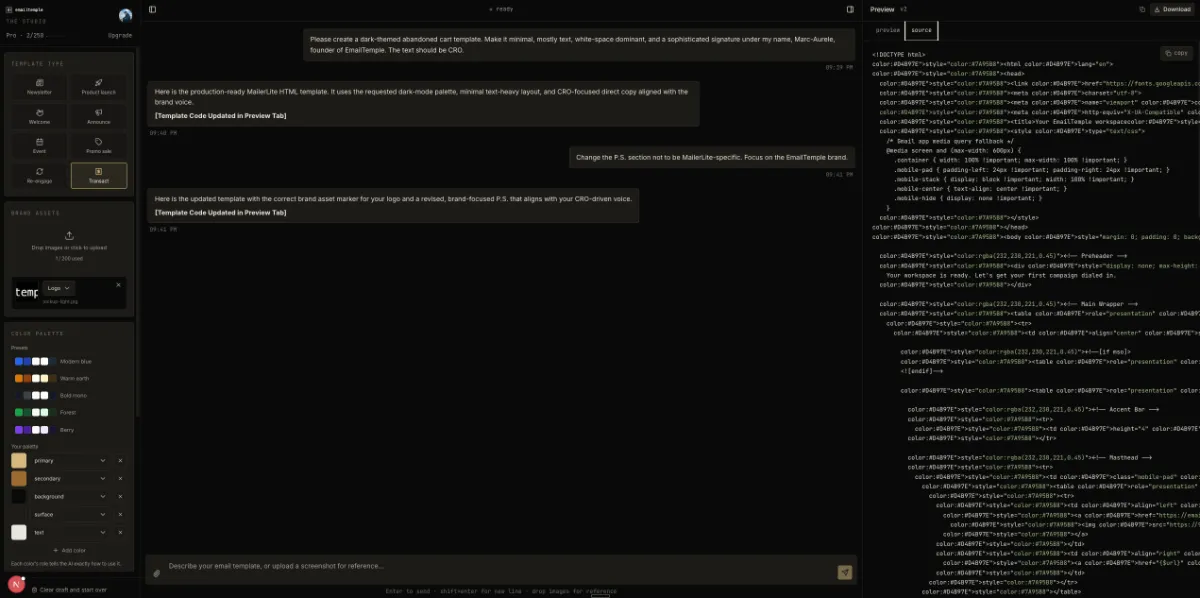
It takes a different route than classic template builders. Instead of asking you to browse a gallery and rebuild the same campaign structure again, it lets you describe what you want, returns a production-ready template, and exports it to your ESP in seconds.
That makes it distinct from most tools in this list. The product is built around templates that earn their open rate, not around giving you more blocks to drag around.

Best for: SMB owners and solo marketers who want a template generated from a sentence, not browsed from a gallery.
Key features
- Prompt-based template generation: Describe the send you want and the studio returns a ready-to-use email template instead of a blank canvas.
- Dark-mode safe output: Templates are built to hold up in dark mode by default, which matters for real inbox rendering now.
- Brand kit application: Saved colors, fonts and logo carry across each generation so campaigns stay visually consistent.
- Direct ESP export: Export in one click to Mailchimp, ActiveCampaign, MailerLite and Klaviyo, or as portable HTML anywhere else.
- Production-ready templates: Output is meant to be sent, not treated like a mockup that still needs cleanup.
- Saved template library: Keep finished templates in your library so recurring sends do not start from zero.
Strengths
- The generative workflow removes most of the gallery-browsing and block-stacking time.
- Typographic quality is positioned above the default templates bundled inside most ESPs — the same gap covered in the solopreneur revenue-leak audit.
- Dark-mode safe output is built into the product approach, not left as an afterthought.
- Export happens in seconds to live ESPs, which keeps design separate from sending without adding much friction.
Weaknesses
- It is still early, with fewer live ESP integrations than Stripo, 3 versus Stripo’s much broader export coverage.
- There is no drag-and-drop editor for users who want pixel-level manual control.
- The template library is smaller by design because the workflow is based on generation, not browsing a large gallery.
Who it’s for
EmailTemple fits small business owners and solo marketers who have a list but are sending too rarely because their current ESP templates make every campaign look cheap. It is a strong fit when speed, brand consistency and send-ready output matter more than manual design control.
Pricing
- Free generation to try: Lets users test the workflow before committing.
- Paid plans: Structured around generations per month.
2. Beefree
Overview
Beefree is a drag-and-drop email and landing page editor designed for teams that want polished creative control inside a visual builder.
Its biggest advantage is breadth. You get a large template library, landing page support, reusable blocks and a workflow that suits marketers who do not mind starting from a gallery and refining from there.
Best for: Freelancers and small design-led teams who want polish and do not mind browsing before they build.
Key features
- Large template library: Includes around 1,500 templates for email creation across common campaign types.
- Built-in stock assets: Comes with more than 500,000 stock images plus light in-app editing options.
- Landing page support: Offers 410+ landing page templates alongside email design tools.
- Reusable content blocks: Save repeatable sections so regular campaigns do not need full rebuilds.
- Brand controls: Helps teams keep colors, logos and core visual settings more consistent across work.
Strengths
- The template library is much larger than most small-operator tools will ever need.
- The interface is polished and built for visual editing rather than code-first work.
- Real-time collaboration on paid tiers makes it more practical for teams than solo-only builders.
- It covers both email and landing pages, which is useful for campaigns that need both assets in one workflow.
Weaknesses
- It offers fewer ESP integrations than Stripo, with 26 compared with Stripo’s broader coverage.
- There is no built-in HTML code editor for teams that want direct code-level adjustments.
- The free tier includes Beefree branding, which limits how usable it feels for client or brand-facing work.
- The workflow still starts with gallery browsing, so you are picking and editing templates rather than describing the send you want.
Who it’s for
Beefree fits freelancers, consultants and small design-led teams that care about visual polish and want a mature drag-and-drop builder. It makes more sense for users who like editing from a strong starting template than for operators who want the first draft generated from a sentence.
Pricing
- Free: Free with Beefree watermark.
- Professional: $30/month.
- Business: $160/month.
- Enterprise: Custom pricing.
3. Topol
Overview
Topol is a budget-friendly drag-and-drop email template builder for solo marketers who want simple, not sophisticated.
It focuses on the basics: ready-made templates, a clean builder and low monthly pricing. That makes it appealing when the goal is to get decent campaigns out without paying for a bigger design system.
Best for: Solo marketers and tiny teams on a strict budget who send simple campaigns.
Key features
- Template library: Includes 360+ mobile-responsive templates on paid plans.
- Reusable blocks: Lets users save repeated sections for faster campaign setup.
- Built-in AI assistance: Adds some help inside the creation workflow rather than leaving everything manual.
- Pexels integration: Pull in stock imagery without leaving the builder.
- Team folders: Organize work across brands or clients more cleanly.
- Flexible export: Export templates to HTML or JSON.
Strengths
- It has the cheapest paid tier on this list at $10/month.
- The interface is clean and approachable for solo users.
- Team folders and workspace organization are useful when managing multiple clients or brands.
- It covers the basics well enough for simple recurring campaigns.
Weaknesses
- It has only 26 integrations, and those are gated behind paid access.
- The free plan is limited, with access to 180 templates and few export options.
- Feature depth is thinner than what you get in Beefree or Chamaileon.
- The workflow still depends on gallery browsing rather than generating a template from the brief you type in.
Who it’s for
Topol fits solo marketers and very small teams that need a low-cost way to build and export straightforward email campaigns. It makes the most sense when budget matters more than advanced collaboration, deep brand controls or a more generative workflow.
Pricing
- Free: Limited plan.
- Pro: $10/month.
- Team: $15/month for 3 seats.
4. Postcards by Designmodo
Overview
Postcards is a modular email builder where designers assemble pre-built blocks rather than drag-and-drop or generate from a prompt.
That structure is the main appeal. Instead of starting from a blank screen, you work from ready-made sections and combine them into a cleaner, more controlled layout system.
Best for: Designers who like structured boundaries and want clean code they can edit later.
Key features
- Modern template set: Includes 160+ email templates for common campaign formats.
- Modular design system: Offers 100+ design modules that can be mixed into new layouts.
- Large font library: Supports 900+ Google Fonts for more flexible brand styling.
- Clean HTML export: Produces code that is easier to export and adjust manually later.
- Team collaboration: Supports viewer and editor roles for shared workflow control.
- Live collaboration cues: Includes cursor sharing for real-time teamwork.
Strengths
- The modular system can speed up production for designers who prefer structured assembly over open-ended editing.
- Clean code output is useful when templates will be adjusted manually after export.
- Pricing is straightforward and easier to parse than many competing builders.
- Real-time collaboration on paid tiers makes it workable for small teams.
Weaknesses
- The block-based workflow is less flexible than Beefree if you want freer layout control.
- The free plan is capped at 10 projects and 5 exports per month.
- The template library is smaller than what you get in Beefree or Stripo.
- It still depends on browsing templates and modules rather than generating the first draft from your brief.
Who it’s for
Postcards fits designers and marketers who want a tighter system with cleaner boundaries than a typical drag-and-drop editor. It is a better match for people who value structured modules and exportable code more than visual freedom inside the builder.
Pricing
- Free: 10 projects.
- Plus: $19/month.
- Pro: $29/month.
5. Chamaileon
Overview
Chamaileon is a high-end email design platform built around real-time team collaboration, priced for agencies, not solo operators.
Its main selling point is shared workflow. The product is built for teams that review, comment, revise and approve together, not for one person trying to get a campaign out cheaply.
Best for: Marketing agencies and larger in-house teams who run shared review cycles on every send.
Key features
- Real-time co-editing: Multiple users can work in the same template at once, in a Google Docs style workflow.
- Built-in commenting: Teams can leave feedback directly inside the design process.
- Shareable design links: Makes review and approval easier for clients or internal stakeholders.
- Structured editor: Keeps the build process more controlled than a free-form canvas.
- Smart responsive behavior: Adapts layouts across mobile and desktop views.
- Role controls: Supports custom roles for different contributors.
Strengths
- Collaboration is the strongest on this list for teams that actually co-edit.
- The editor is clean and built for structured production rather than chaotic handoffs.
- Feedback loops are faster when comments, reviews and revisions happen in one place.
- HTML output is positioned as high quality, which helps once designs move toward send-ready production.
Weaknesses
- It offers only 24 integrations, and unsupported ESP connections may require webhooks.
- The entry price, $300/month for 3 seats, is dramatically higher than every other tool in this roundup.
- The feature set makes more sense for agencies than for a solo operator sending regular campaigns.
- For one-person workflows, the price climbs much faster than the practical value.
Who it’s for
Chamaileon fits agencies and larger in-house marketing teams that need real-time review cycles, shared approvals and role-based control on every campaign. It is a poor fit for solo users unless collaboration is the main requirement and price is a secondary concern.
Pricing
- Free trial: 14-day free trial.
- Paid plans: From $300/month for 3 seats.
6. Bee
Overview
Bee, meaning the embeddable Bee Plugin from the same company behind Beefree, is a white-label email editor for SaaS companies and developers who want to place a builder inside their own product.
This is a different category from the rest of the list. It is not mainly for marketers shopping for a standalone editor, it is for product teams that need email creation as a feature.
Best for: SaaS founders and product teams adding email design inside their own platform, not solo marketers.
Key features
- Embeddable editor: Adds a drag-and-drop email builder directly inside another product.
- White-label setup: Lets teams customize the experience to match their own brand.
- API access: Supports deeper product integration and custom workflows.
- Responsive templates: Includes templates built for mobile-friendly email creation.
- ESP connectivity: Supports integration with major ESPs.
- Developer docs: Comes with documentation aimed at implementation teams.
Strengths
- It is the only tool in this list built specifically to be embedded inside another software product.
- The developer experience is stronger than what most end-user email builders offer.
- White-label and API options make it more adaptable for SaaS use cases.
- Licensing is flexible enough to fit product teams rather than just marketing departments.
Weaknesses
- It is not built for end marketers who just want a standalone place to create and send campaigns.
- It requires engineering work before it becomes useful.
- Pricing is not public, so teams need a sales conversation before they can properly compare costs.
- For anyone who only wants to design their own emails, it is more infrastructure than they need.
Who it’s for
Bee fits SaaS founders, product managers and engineering teams that want email design built into their own platform. It does not make much sense for solo marketers or small operators choosing a direct Stripo replacement for day-to-day campaign work.
Pricing
Pricing not publicly listed at time of writing.
Stripo alternatives comparison table
Here is a side-by-side view of the six tools in this roundup, using the same criteria across every entry. It is designed for quick scanning, with each row focused on workflow, export coverage, price and the main trade-off.
| Tool | Best for | Core workflow | Live ESP exports | Starting paid price | Main limitation |
|---|---|---|---|---|---|
| EmailTemple | Small operators, fast sends | AI-generative | Mailchimp, ActiveCampaign, MailerLite | Free to try | Only 3 live ESPs |
| Beefree | Design-led small teams | Drag-and-drop | 26 integrations | $30/month | You still browse templates |
| Topol | Budget solo marketers | Drag-and-drop | 26 integrations, paid | $10/month | Limited depth and exports |
| Postcards | Designers wanting clean code | Modular blocks | HTML export | $19/month | Less flexible layouts |
| Chamaileon | Agencies with review cycles | Drag-and-drop | 24 integrations | $300/month | Very expensive for solo users |
| Bee | SaaS teams embedding editors | Embeddable editor | Major ESP integrations | Custom pricing | Needs engineering to use |
How to choose the right Stripo alternative for your business

Define what you’re really paying for: time, polish or generative speed
Most tools here split into three camps. Gallery-browsing tools like Beefree, Topol, Postcards and Chamaileon sell polish, modules and visual control, while EmailTemple sells a faster path from blank screen to sendable template, and Bee sells product integration.
That distinction matters more than feature count. If you hate starting from a gallery, more templates will not fix the problem. The bigger question, covered in what to send when you have nothing to say, is whether the container is keeping you from sending at all.
Check ESP coverage before pricing
Before you compare monthly plans, check where the template actually exports. Stripo covers 80+ destinations, while most alternatives here sit closer to 24 to 28, and EmailTemple exports natively to Mailchimp, ActiveCampaign, MailerLite and Klaviyo, plus portable HTML anywhere that takes an upload.
That can change the decision fast. A cheaper tool is not cheaper if it cannot send through the ESP you already use, so check the export list first, then compare price.
Test dark-mode rendering on a real send
Do not judge an email builder from the editor alone. Build one sample, send it to your own inbox, switch your email client to dark mode and check headings, buttons, logos and background contrast.
This catches the problems that polished previews hide. If the template breaks in a real inbox, the workflow does not matter much after that.
Match the tool to your workflow, not your team size
Pick the tool that fits how work actually gets done. A solo operator with a list usually does not need real-time co-editing, and an agency does not need an embeddable editor unless it is building email creation into its own product.
The same rule applies in reverse. If your bottleneck is getting from idea to finished template quickly, a generative studio makes more sense than a bigger gallery; if your bottleneck is shared review and approvals, a collaborative editor will fit better. And if the bigger question is whether email is even the right channel for your spend, the direct mail vs email cost comparison breaks down the per-send math first.
Once the template tool is chosen, the next bottleneck is usually the send itself. If your current ESP templates are quietly leaking revenue, you can generate your own production-ready template in the EmailTemple studio for free and ship the next campaign without a gallery hunt.
Frequently asked questions
What is the best free Stripo alternative?
The best free option depends on how you like to work. Beefree is strong if you want to browse polished templates, while Topol gives free users access to 180 templates on a more budget-focused builder.
If you do not want a watermark-based gallery workflow, EmailTemple offers free generation to try. That gives you a different path: describe the template you want and get a production-ready file back, rather than picking from a library first.
Is there an AI-powered alternative to Stripo?
Yes, EmailTemple is the AI-generative option in this list. You describe the email you want in a sentence, and the studio returns a production-ready template file.
That is a different workflow from Stripo and most of the other alternatives here. Instead of browsing layouts and editing blocks, you start from the send itself and work forward.
Which Stripo alternative has the most ESP integrations?
Stripo still leads this category with 80+ integrations. Among the alternatives in this roundup, Beefree and Topol sit around 26, while Chamaileon sits at 24.
EmailTemple has 4 live native exports: Mailchimp, ActiveCampaign, MailerLite and Klaviyo. Everywhere else it exports clean, portable HTML that imports into any platform taking an HTML upload, so the practical number is not really 4. Native syntax for ConvertKit, Beehiiv and Ghost is on the roadmap and is not counted as live here.
Can I switch from Stripo to another builder without losing my templates?
Usually, not in a clean one-to-one way. You can export HTML from Stripo and move that code into a tool with an HTML editor, but you typically lose the original modular editing structure.
In practice, most operators rebuild the templates they still use rather than trying to migrate every block perfectly. That is often faster than preserving an old layout inside a different editor model.
Are Stripo alternatives cheaper than Stripo?
Some are, and some are not. Topol is the lowest paid option in this roundup at $10/month, while Beefree starts at $30/month and Postcards at $19/month.
At the other end, Chamaileon starts at $300/month for 3 seats, which makes it far more expensive than most small operators need. Price only helps if the workflow and export coverage also fit what you already use.
Do Stripo alternatives support dark-mode email?
Some do, but support varies by workflow and output quality. The safest way to judge any builder is to send a real test to your own inbox and check it in dark mode.
That matters because preview support and real inbox behavior are not the same thing. EmailTemple positions its templates as dark-mode safe by default, which is useful if dark-mode rendering is a recurring problem in your current setup.