
Introduction
If you’re trying to figure out how to create a Klaviyo HTML campaign with the API, the missing piece is the sequence. Klaviyo’s docs show the relevant parts, including HTML templates with dynamic variables in a CODE editor, but the full path is spread across separate pages, so the practical answer to “how is that done?” stays buried.
This guide is for a developer or technical operator working with a private API key who wants the full draft-safe flow in one place. It walks through the end-to-end order for Klaviyo’s Campaigns API, then gets into the real frictions that show up once you move from “can this be done?” to a working campaign-creation workflow.
The Klaviyo HTML Campaign Sequence at a Glance
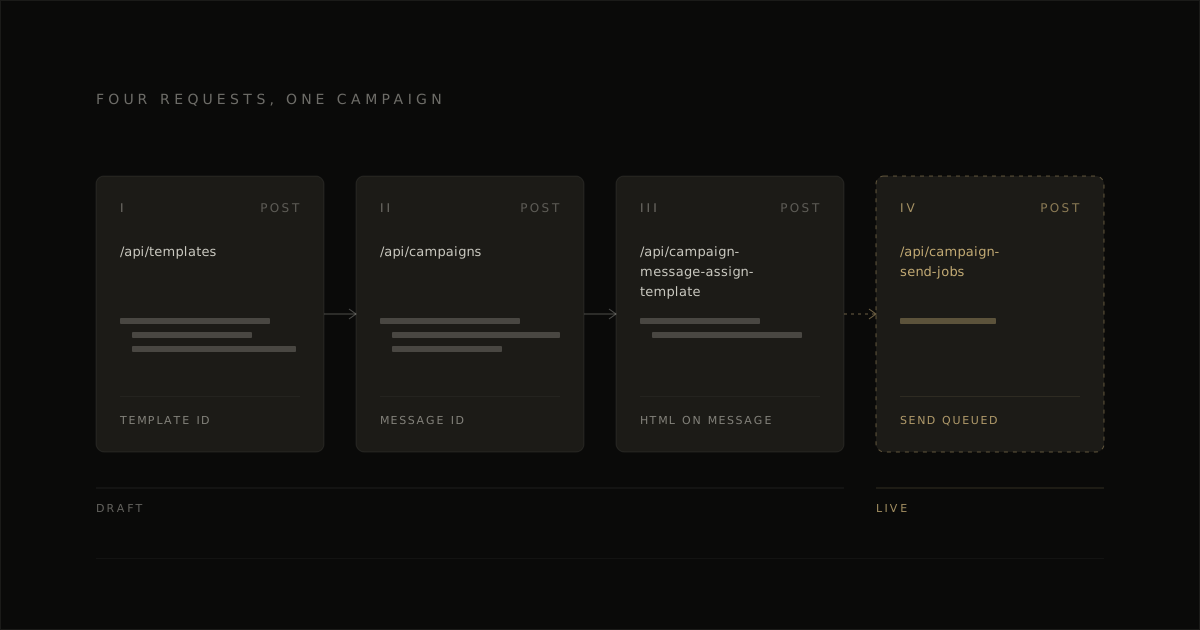
The working flow is simple: authenticate, create a CODE template, create the campaign with its required audience, assign the template to the campaign message, and keep it as a draft by stopping before any send job. That sequence is the whole job, and it’s the part most people need in one place before they dig into payload details.
Authenticate every request
Send your private API key with the request so Klaviyo accepts the call.
Pin the revision header
Set the Klaviyo revision header you’re building against so the request shape stays consistent.
Create the CODE template
Use the Templates API to create the HTML email template you want the campaign to use.
Create the campaign with its audience
Create the campaign through the API with the list or segment ID attached, because the audience is part of the campaign object.
Assign the template to the campaign message
Attach the HTML template you created to the campaign message with the assign-template call.
Then stop there. Your draft is ready, and no send job is called.
What you need before you start
You need three things in hand before the calls start: a private API key, a pinned revision header, and an audience ID. Once those are fixed, the rest of the flow is just sequencing.
| item | value |
|---|---|
| Private API key | The API key used to authenticate each request |
| Pinned revision header | The Klaviyo API revision header you send on each request |
| Audience ID | A list ID or segment ID for the campaign audience |
For the full guide, see our Klaviyo email templates.
The three calls in order
Every request carries two headers: your private API key in Authorization and a pinned revision. Then come three calls: POST /api/templates, POST /api/campaigns with the audience attached, then POST /api/campaign-message-assign-template, plus an optional GET for the message ID when the campaign response leaves it out. That order keeps the draft intact and gives you a clean handoff point before sending enters the picture.
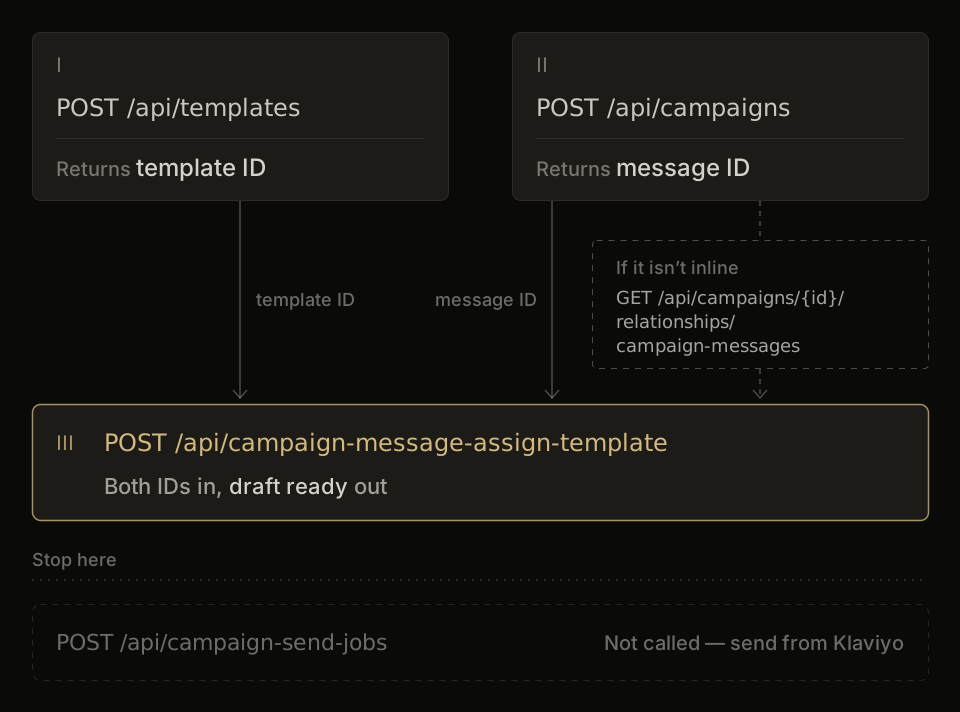
A practical way to think about it is this: the Templates API creates the asset first, the campaign call creates the container tied to a real audience, and the assign call connects the two. Why does order matter? Because the assign call needs the template ID from the first call and the message ID from the second, so both must exist before you connect them.
Authenticate and Pin the Revision Header
Authenticate with your private Klaviyo API key in the Authorization header, using the global base URL https://a.klaviyo.com and the JSON:API media type application/vnd.api+json. The practical header set is simple: Authorization: Klaviyo-API-Key pk_..., accept: application/vnd.api+json, and content-type: application/vnd.api+json when you send a body. Klaviyo Campaigns API work starts cleanly here because there is one base URL to target, so you can skip any per-account server prefix lookup.
The part that trips people first is Klaviyo’s revision header. Klaviyo versions the API by date, and every request should carry the dated revision string in revision, because the revision header is what pins the response contract your code expects. So, treat revision bumps as deliberate changes: set one current dated revision string in your client, keep it pinned, and re-check payload shapes when you update it.
Create a CODE-Editor HTML Template
Create the template first with a name, an editor_type of CODE, and your full HTML in the html field. In practice, this is the cleanest part of the flow: the Templates API accepts a full HTML document for a CODE template, so hand-authored email HTML fits the model directly and lines up well with the Campaigns API sequence you started in the previous steps.
Klaviyo is unusually permissive here. Its custom HTML import flow accepts a standalone .html file, keeps the document structure intact, and requires Klaviyo tags inside the markup, including an unsubscribe tag such as {% unsubscribe %}. That same rule is worth carrying into the API version too: keep the HTML brief, use Klaviyo syntax like {{ first_name }} for personalization, and build the body you actually want to send. If you need the platform-side template rules in more depth, use separate Klaviyo HTML template guidance, because the Templates API step itself is just about creating the CODE template object cleanly.
A minimal payload shape looks like this in prose:
POST /api/templates/name: a clear internal template nameeditor_type:CODEhtml: your full email HTML, including Klaviyo variables and an unsubscribe tag
For example, the request body structure is:
{
  "data": {
    "type": "template",
    "attributes": {
      "name": "Draft campaign template",
      "editor_type": "CODE",
      "html": "<html>...your email HTML with {{ first_name }} and {% unsubscribe %}...</html>"
    }
  }
}
The output you care about from this step is the template ID. You’ll use it later, in the assign call, to attach the template to the campaign message.
Create the Campaign With Its Required Audience
Create the campaign by sending the campaign attributes together with an audience ID, because Klaviyo requires the audience at creation time. In Klaviyo’s Campaigns API, that means your payload needs the campaign data plus audiences.included with a list or segment ID, alongside the email message definition fields such as subject, from email, from label, reply-to email, and preview text.
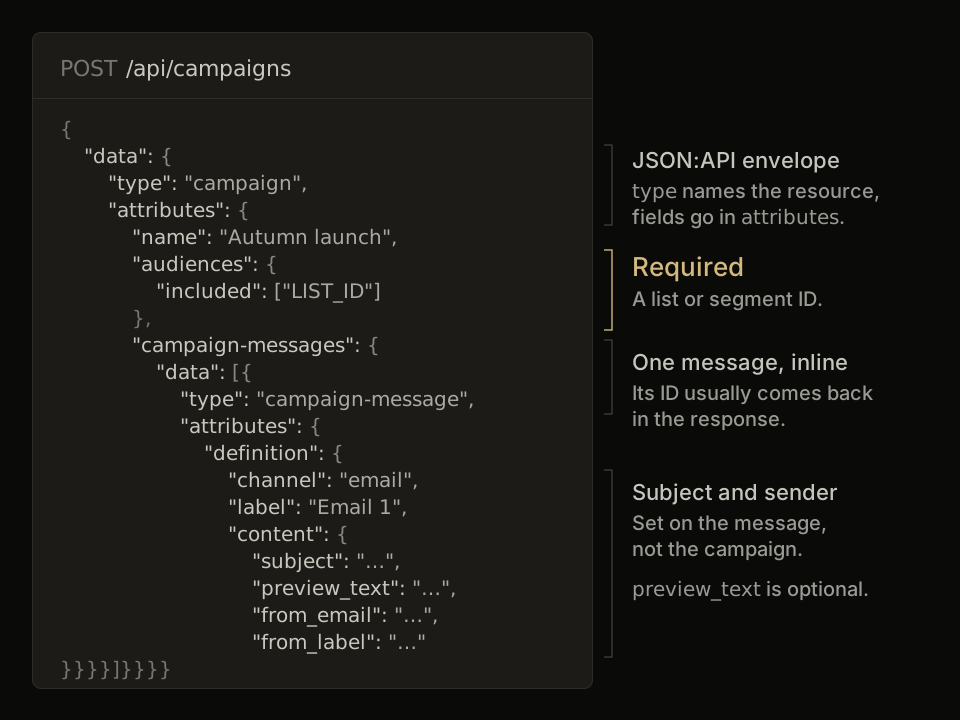
A short sketch of the create call looks like this: type: campaign, a name, audiences: { included: ["LIST_OR_SEGMENT_ID"] }, and the nested email message content inside campaign-messages. The practical catch is the audience lookup itself: if you’re pulling list IDs from the API, lists paginate at 10 per page, so even a small account can need a paging loop before you have the right ID to place in the create call.
Assign the Template to the Campaign Message
Assign the template to the campaign message as soon as the campaign exists, because that is what gives the draft its actual email content. In Klaviyo’s Campaigns API, this is a separate step: create the HTML template first, create the campaign with its audience, then assign the template to the campaign message with POST /api/campaign-message-assign-template, which copies the template onto the message and leaves the library template editable.
Keep the payload short and focused on the relationship you are setting. That makes this easier to debug, and it matches the real shape of the flow developers actually need when they assign the template to the campaign message after campaign creation.
When the message ID isn’t returned inline
Fetch the campaign’s message relationship first when the message ID is not present in the create-campaign response. Use the campaign ID to call GET /api/campaigns/{id}/relationships/campaign-messages, take that message ID from the response, then call the assign endpoint with the message ID plus the template ID.
This is where people usually stall, because the docs make the assign step look immediate even when the message resource needs one extra lookup. The practical fallback is simple: create campaign, get campaign message, assign template. Once that relationship is set, the campaign draft has content attached and is ready for the next draft-safe step.
Keep It a Draft: Why to Skip Send Jobs
This workflow ends at a draft campaign, with no send job call at all. In Klaviyo’s Campaigns API, that means you stop after the template is attached to the campaign message, and you leave scheduling to the Klaviyo app where a human can review the audience, content, and timing in one place.
POST /api/campaign-send-jobs is the call you leave out. It is the step that moves a finished campaign into scheduling, and Klaviyo pairs that stage with recipient estimation for campaign sends. So for a build-and-test flow, the safe default is simple: use the API to assemble the draft, then use the Klaviyo UI for the final send decision. That keeps automation focused on setup, and it keeps the send job behind an explicit human check.
The API Frictions Worth Knowing Upfront
The main frictions are simple and predictable: pagination on lists, a 1,000-template ceiling, unregistered custom properties, and throughput of about 1 second per call. In Klaviyo’s Campaigns API, those constraints matter most when you move from a one-off draft to repeated production use, and Klaviyo’s rate limits are part of that planning from day one.
| Friction | What it means | How to plan around it |
|---|---|---|
| Lists paginate 10 per page | Audience lookups span pages fast | Build pagination into list selection |
| 1,000 API-template cap | Template count needs lifecycle control | Reuse, archive, and name systematically |
| No merge-field enumeration endpoint | Custom properties come from sampling | Show standard fields plus sampled keys |
| ~1 second per call throughput | Multi-call flows stay sequential | Budget time per user action |
| Low-limit endpoints | Accounts and flows allow 1 call/sec, flows also 100/day | Call them once per action. Template and campaign creation are not on this tier |
These are build-shaping constraints, not edge cases. EmailTemple measured the slowest path, a 5-email sequence push, at 15.2 seconds for 15 API calls on the campaign route, and 7.0 seconds for 7 calls on the flow route, which puts a full draft push comfortably inside a 60-second serverless window.
The sharpest practical gap is field discovery. Klaviyo has a fixed set of standard profile attributes (name, email, phone, location and so on), but custom profile properties live in a freeform properties object with no registry, so any field picker has to infer them from recent profiles and disclose that sample clearly.
The Claude Code Plus API Key Route
A practical fallback is to run the same sequence from Claude Code with a Klaviyo private key. That keeps Claude in the loop for drafting requests and checking payload shape, while the actual Campaigns API calls go straight to Klaviyo over HTTPS using your own authorization header and revision header, the same way the earlier sections outlined.
This route is the one many operators reach for when they want steadier execution than the connector path. Klaviyo’s listed Claude connector can expose campaign read and write actions, but reported friction includes temporary disconnects, looping auth approvals, and wrong revenue figures, so the direct-key approach gives you a simpler path: Claude Code generates or refines the request, you send it with your private key, and you verify the returned IDs and payloads before the next step. In practice, if your goal is to create a draft template, create the campaign, and attach the message cleanly, campaign creation is usually more predictable when the API call is yours end to end.
Where to Go From a Working Draft
The flow is straightforward: authenticate, create the CODE template through the Templates API, create the campaign through the Campaigns API with its audience, assign the template to the campaign message, and stop there so the campaign stays in draft. From that point, your next job is quality control inside Klaviyo: check merge tags, preview the message, confirm the audience, and make sure the final HTML looks right before anyone schedules it.
A good next read is our Klaviyo abandoned cart best practices guide, especially if your first API-built draft is part of an automated revenue flow and you want the content side dialed in too. And if you want the HTML itself handled for you, Generate your branded template for free.
Frequently Asked Questions
Can you create and edit HTML campaigns through the Klaviyo API?
Yes, you can create an HTML email campaign through the API and update it while it remains in draft. In this flow, the content lives in a CODE template that you assign to the campaign message, then you can update campaign attributes or the message before scheduling.
That is why the sequence matters: template first, campaign second, template assignment third. Once the draft exists in Klaviyo’s Campaigns API, you still have room to revise the draft-stage campaign data before any send step.
Why does creating a Klaviyo campaign require an audience?
Creating a campaign requires an audience because Klaviyo expects the campaign and its recipient target to be defined together at creation time. In practice, that means your create-campaign request includes the campaign data plus the audience ID.
So if you are assembling requests programmatically, keep the audience lookup or selection step before campaign creation. That keeps the payload valid on the first pass.
What happens if the campaign message ID isn’t in the response?
If the campaign message ID is not returned inline, fetch the campaign’s message relationship with GET /api/campaigns/{id}/relationships/campaign-messages and read the message ID from there. That gives you the message resource you need for template assignment or later draft updates.
This is a normal API handling step, not a separate campaign-building path. Once you have the message ID, the rest of the flow stays the same.
How fast is the Klaviyo API for bulk campaign creation?
In EmailTemple’s own test, each call took about a second. If you are generating a batch of drafts, plan the job as a steady queue instead of a rapid-fire burst.
And this matters more once each campaign also needs template creation, campaign creation, and message assignment. The practical win is to build pacing into your script from the start.
Can I edit the HTML after importing it into Klaviyo?
Yes, you can edit imported HTML, and the safest approach is to treat each change carefully and test the result in inboxes. A common friction with Klaviyo custom HTML import is that HTML created outside Klaviyo can pick up styling or structure issues once it is edited again inside Klaviyo’s template context.
So if you update imported code, check rendering after each meaningful change. Small edits are easier to validate than a full round of mixed code and editor changes.
Should I use the Klaviyo MCP or a direct API key with Claude?
A direct API key route with Claude is the steadier choice when you want reliable execution of the exact call sequence. It keeps Claude useful for drafting payloads and checking structure, while the real requests go straight to Klaviyo.
That is why the article includes the fallback path. If connector behavior gets flaky, the direct route keeps the workflow simple and easier to debug.
