
Introduction
For most teams comparing Claude vs ChatGPT for marketing, the useful question is which tool fits each job in the workflow. Claude and ChatGPT both help with marketing work, but they tend to pull ahead on different tasks, and the gap gets clearer once you separate quick copy generation, long-document work, analysis, and email production.
This is for operators and small marketing teams already using one of these tools and trying to figure out where it actually belongs. We’ll go task by task, show where each model is a better fit, and spend extra time on the email HTML test, because that’s where a lot of advice about AI for marketing starts to fall apart in real production work.
Claude vs ChatGPT for Marketing: The Quick Verdict by Task
For marketing work, the better fit depends on the task: Claude leans toward long-form and brand-consistent work, ChatGPT leans toward high-volume and data-heavy work, and email HTML is a tie with no clear winner.
| Marketing task | Better fit | Why |
|---|---|---|
| Long-form content | Claude | Claude is the stronger fit when the job needs long context, heavier editing, and tighter brand-voice consistency across a full draft. |
| Short-form and paid copy | ChatGPT | ChatGPT is a strong fit for rapid-fire ideation and high-volume copy tasks, especially when speed and actionability matter more than deep editing. |
| Email HTML | No clear winner | The evidence on production-ready email HTML is mixed. An April 2026 zero-shot test across ChatGPT, Claude, and Gemini found none ready to ship, and EmailTemple’s August 2026 evaluation found Claude can produce decent table-based HTML while still needing checks for merge tags and compliance details. |
| Research | Claude | Claude pulls ahead when marketers need to work through longer source material, keep more context in play, and turn it into usable content decisions. |
| Data analysis | ChatGPT | ChatGPT is the stronger fit when the work is data-heavy, fast-moving, and tied to recurring marketing analysis or spreadsheet-style tasks. |
| Connectors | Tie | Both ecosystems now plug into the email stack: Mailchimp has apps for ChatGPT and Claude, and Klaviyo lists its connector in Claude’s directory, so access to ESPs is available on both sides. |
Marketing Copy: Where the Brief Beats the Model
For marketing copy, the brief does more of the work than the model. Give either tool a clear brand voice, a defined audience, a specific scenario, and real constraints, and the output gets sharper fast. Give it a vague prompt, and the copy usually lands in the same generic place people complain about.
That matters because the failure mode is consistent: robotic tone, interchangeable phrasing, and extra cleanup before anything is ready to send. In practice, a structured prompt with context like segment, offer, timing, products, and subject-line direction beats a loose request on either model.
Where Claude tends to win
Claude tends to win when the job is long-form content that has to stay steady from start to finish. It usually fits best when you need a landing page draft, a nurture sequence, or a longer sales email where the tone has to hold across multiple sections.
It also tends to do well when the brief includes a reusable brand voice reference. That can be a short messaging doc, a brand Bible, or a live example set. Why does that matter? Because the model has more to anchor to, so the copy reads closer to one company with one point of view, instead of polished filler that could belong to anyone.
Claude is usually the stronger pick for copy tasks like these:
- A welcome sequence where each email needs the same tone and offer logic
- Long-form content with multiple sections that need consistent phrasing
- Rewrite passes where the first draft is already solid and needs voice cleanup
- Messaging work where natural tone matters more than raw speed
Where ChatGPT tends to win
ChatGPT tends to win when the job is volume and speed. It fits best when you need lots of angles quickly, like headline options, subject lines, hook variations, or fast first drafts for campaign ideas.
That makes it strong for exploration work, especially early in the process when you are testing messages, audiences, or offers. Teams using ChatGPT for marketing content often get the most value from it when they ask for batches of variants, then tighten the best ones with a more detailed prompt and a clearer tone target.
A simple rule works here: use ChatGPT to open up options, then use your brief to narrow them into usable copy. One good prompt on either tool beats five vague ones, and the better your inputs get, the less the output sounds like a robot.
Email HTML: The Test That Trips Both Tools
For email HTML, both tools still need production checks before anything ships. The pattern is pretty consistent in the evidence: the copy can be good, the draft can look fine in preview, and the real problems show up when the HTML hits Outlook, Gmail mobile, iOS Mail, or dark mode.
That makes this a workflow question as much as a model question. Generic LLM HTML is useful as a starting point, but shipping quality comes from compatibility checks, inbox testing, and the guardrails wrapped around the output.
What the Knak study found
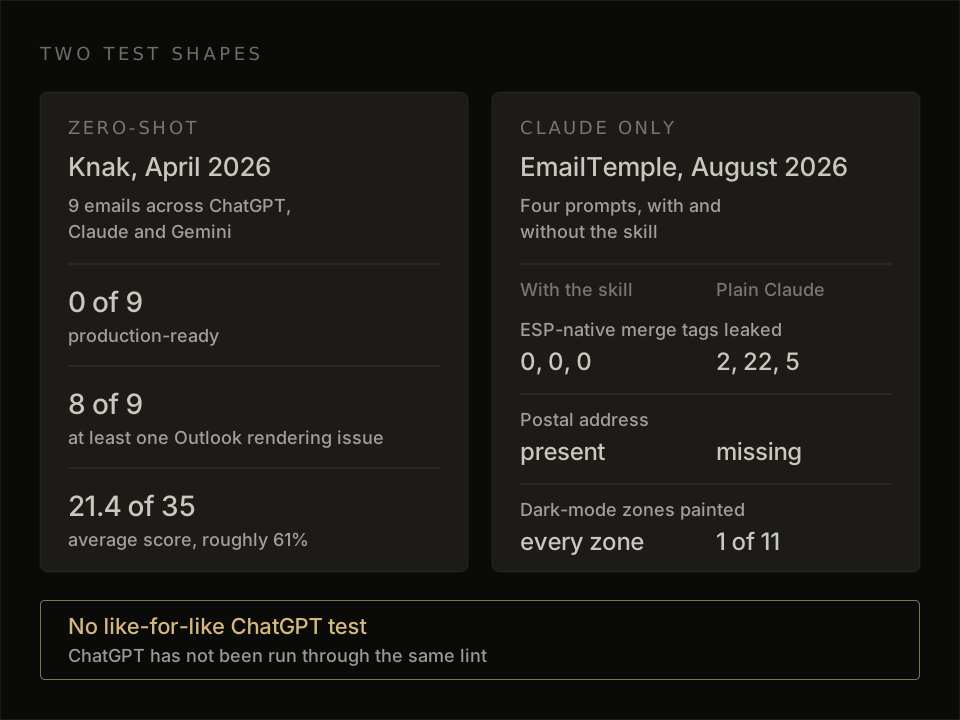
Knak’s April 2026 study found that none of 9 AI-generated emails were production-ready, and Outlook was where the failures clustered. Across zero-shot tests in ChatGPT, Claude, and Gemini, the average score was about 21.4 out of 35, or roughly 61%, with 8 of 9 emails showing at least one Outlook rendering issue.
The failure patterns were concrete and familiar to anyone who has dealt with email code. The outputs used the HTML width attribute or max-width on tables in ways that led to squished layouts in Outlook for Windows and Outlook 2016, fell back to Times New Roman instead of the requested font, used CSS like border-radius that email clients handle unevenly, and treated VML buttons inconsistently.
Why does this keep happening? Because Outlook still renders with Word’s HTML engine, and that is a very specific environment. A model can generate clean-looking content faster, but production email quality depends on coding around email-client quirks, especially in Outlook.
What our Claude-only evaluation showed
Our August 2026 Claude-only evaluation showed the same broad pattern: decent table-based HTML, then issues that matter once the template moves toward a real send. The structure was usable, but the output mixed merge-tag dialects, dropped the postal address, and painted 1 of 11 dark-mode zones until something checked it.
That’s the part teams usually underestimate. A draft can look close, while the final 10% of quality comes from details like ESP syntax, footer completeness, dark-mode behavior, and client-by-client rendering checks. In practice, AI-generated email HTML still works best as working content that gets reviewed, corrected, and tested before export.
Why no HTML winner can be declared yet
No HTML winner can be declared yet because ChatGPT has not been run through the same lint. We have a third-party zero-shot study showing all three major models struggle with production-ready email HTML, and we have a Claude-only evaluation showing where one model still needs checking, but those are two different test shapes.
Practitioners do lean toward Claude for HTML in some workflows, usually because its structure can feel cleaner on first pass. That is a preference signal, not a measured head-to-head result. So the honest read is simple: for production email HTML, both tools sit in draft territory until inbox testing confirms the real output.
Research and Long Documents
For research work, the split is pretty clear: Claude suits long-context synthesis, and ChatGPT suits source-heavy pulls. If you’re working across long briefs, multiple competitor pages, and several background documents at once, Claude tends to stay more coherent as the context grows. That matters when the job is to absorb a lot, keep the thread, and turn it into a clean point of view instead of bloated copy you have to cut back down.
ChatGPT tends to pull ahead when the research task depends on broader citation coverage and more source collection up front. That makes it a stronger fit for breadth-first research, while Claude is usually the better fit for depth-first synthesis across fewer inputs. Both still need manual verification before anything gets used in live marketing work, because each tool can produce fabricated or weak source claims, and a clean-looking citation list is only useful once a human has checked the underlying source.
Marketing Data and Analysis
For marketing data and analysis, ChatGPT is the stronger fit when the job depends on running actual computations on uploaded files in one session. That matters for work like segmentation, cohort cuts, reporting, forecast models, and charts, because the tool can execute the analysis on the CSV itself and generate computed outputs from the file you gave it.
Claude fits a different kind of data analysis workflow: reviewing more context across multiple files, comparing documents side by side, and helping shape what analysis to run next. If the job is to cross-reference several datasets, notes, and supporting docs together, the larger context window is useful. If the job is to calculate, chart, and generate outputs directly from the data, ChatGPT has the clearer edge.
Connectors: How Each Tool Plugs Into Your Marketing Stack
Connectors decide how well these tools fit into your marketing stack, and right now the split is simple: Mailchimp offers an app for both Claude and ChatGPT, while Klaviyo appears in Claude’s connector directory. In practice, that means both tools can plug into real email workflows, pull account data, and help draft campaign assets, but availability is a point-in-time detail that can shift as the platforms update their tools.
A connector is best thought of as a drafting and reporting layer inside the stack, not the final operator. Klaviyo’s own Claude Cowork examples show this clearly: it can pull a Monday performance digest, draft copy for a lapsed-customer segment, audit a flow, and assemble reporting across accounts in one session. But the safer operating pattern is still human approval inside the ESP, because connectors can lose the connection mid-task, and revenue figures can differ from the ESP dashboard when the tool is querying raw events instead of the reporting layer with attribution applied. The practical split is clean: the AI tool drafts, analyzes, and exports; the ESP sends.
What Each Tool Costs
At the individual level, Claude and ChatGPT both sit around the $20 per month mark for their paid plans, so pricing rarely decides the choice on its own. Once you move into team and API pricing, the structure matters more: costs shift with model, usage volume, and workflow shape, so pricing is much more about how your team plans to use the tool than about a simple headline number. And because vendor pricing changes over time, treat any current pricing as point-in-time and confirm the latest plan and API details on each vendor’s site before you commit.
How to Choose (and When to Use Both)
The right setup comes down to where most of your marketing hours go. If your work leans toward planning, positioning, research, and long-form writing, Claude is enough. If your workload is heavier on data analysis, fast iteration, and high-volume drafting, ChatGPT is enough.
Pick one when budget is tight
Claude is the cleaner single-tool choice when your work is mostly strategic. That covers campaign planning, message development, long documents, and brand-sensitive copy where a stronger brief and steadier voice matter more than raw speed.
ChatGPT is the cleaner single-tool choice when your work is mostly about speed. It fits better when you’re producing lots of short-form drafts, working through spreadsheets or uploaded files, and doing more hands-on editing across many quick variations.
A simple way to choose is this:
- Pick Claude when the bottleneck is thinking through the message.
- Pick ChatGPT when the bottleneck is throughput.
- Pick based on the job mix you repeat every week, not the occasional one-off task.
Run both when output volume is high
Using both makes sense for teams publishing every week and moving across several job types in the same cycle. A practical split is simple: use Claude for strategic work and long-form assets first, then use ChatGPT for volume, repurposing, and data-heavy tasks.
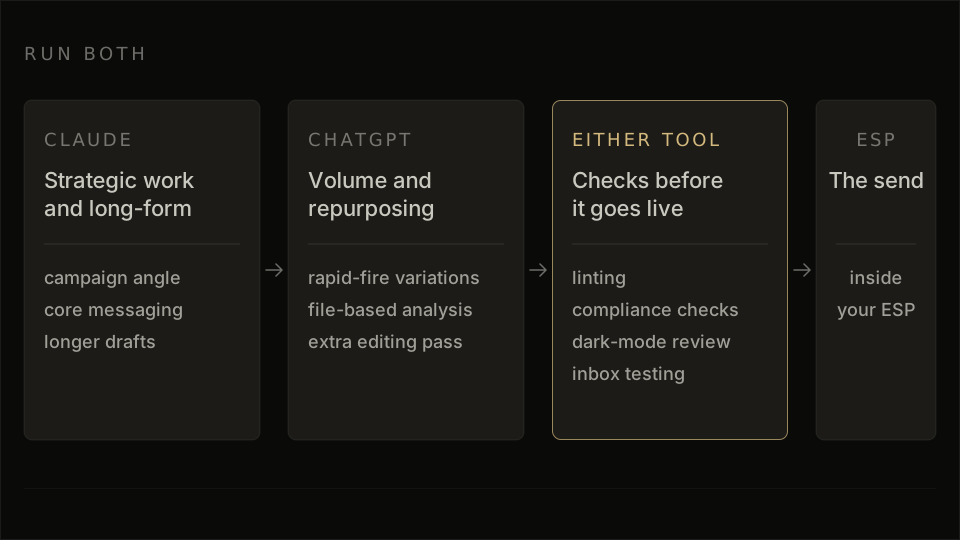
That setup maps well to how teams actually work. One tool shapes the campaign angle, core messaging, and longer drafts. The other handles rapid-fire variations, file-based analysis, and the extra editing pass that turns one good asset into five usable ones.
Email is the place to stay disciplined. Whichever tool writes the copy or drafts the HTML, the send still benefits from linting, compliance checks, dark-mode review, and inbox testing before it goes live.
If you want the linting and compliance checks built in, generate your branded template for free with a Claude skill that lints its own HTML before you see it.
Frequently Asked Questions
Is Claude or ChatGPT better for email marketing?
The better choice for email marketing depends on the job: Claude fits planning, brand voice, and longer context, while ChatGPT fits faster drafting and data-heavy support work. For actual campaign builds, email HTML from either tool still needs inbox testing, because the draft can look fine in preview and still break in real clients.
Which AI writes better marketing content?
Claude usually pulls ahead when the job is long-form editing, clearer structure, and keeping brand voice consistent across a bigger brief. ChatGPT usually pulls ahead when the content job is rapid ideation or high-volume variation, and our guide to ChatGPT email prompts is the more useful next step if your work is specifically email drafting.
Can Claude or ChatGPT produce email HTML that renders in Outlook?
Claude and ChatGPT can produce email HTML drafts, but Outlook rendering still needs production checks before anything ships. Generic LLM output commonly breaks in Outlook, so the practical move is to lint the code, test it in inboxes, and treat the model output as a first draft.
Which AI is better for marketing research?
Claude is the stronger fit for marketing research when the work involves long briefs, large documents, and synthesis across many pages in one pass. ChatGPT is still useful when the job leans more toward pulling specific items, working through structured data, or turning findings into follow-up tasks for the team.
Should my team pay for both?
A team gets value from both tools when output volume is high and the workflow splits naturally between drafting, editing, analysis, and research. If the workload is narrower, one tool is usually enough, and the best pick comes from where most of the team’s hours actually go.
Can Claude send marketing emails on its own?
Claude can help draft and refine email work inside connected workflows, and the practical role today is drafting support inside the stack. The actual send still sits inside your ESP or marketing platform, so connectors support the workflow and the platform handles execution.
