
Introduction
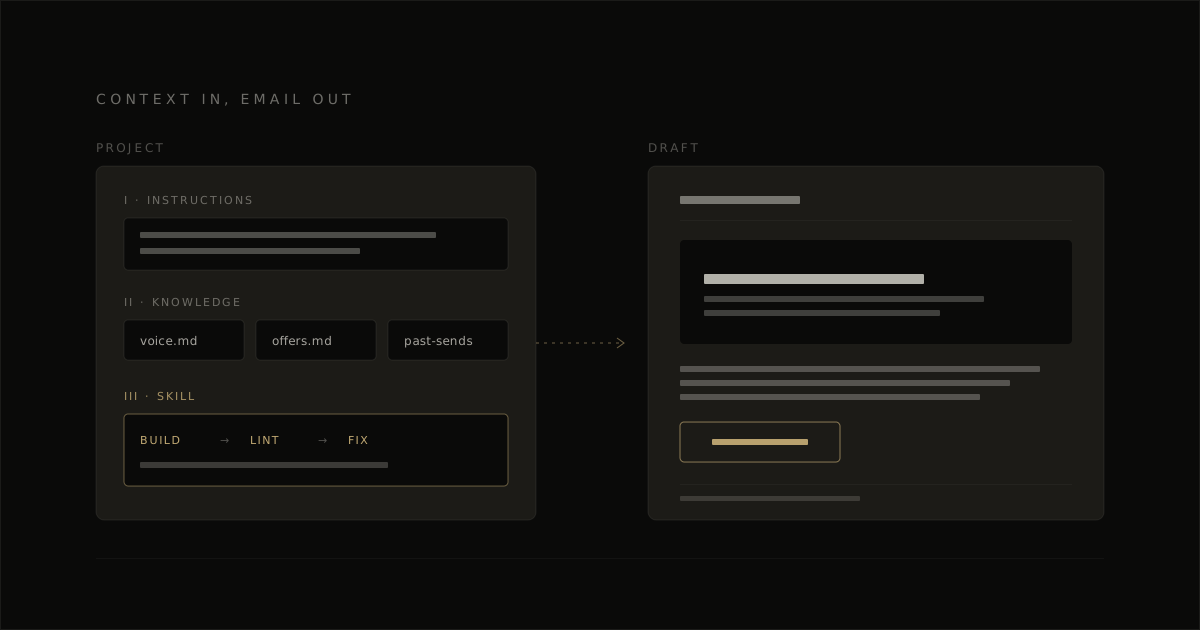
If you’re looking for how to use Claude for email marketing, the real win is connecting the whole job: brief, draft, build, check, and send. Most teams already use Claude for email copy, but the campaign itself still gets assembled by hand, with the HTML, visuals, and ESP handoff sitting outside the prompt.
This guide is for the operator who already has a list and already writes with Claude, and wants one Claude email campaign workflow that carries a single send from brief to inbox. We’ll walk one campaign all the way through, so each step lands in something you can actually ship.
How to use Claude for email marketing in five steps
The full Claude campaign workflow is: brief the campaign, write and refine the copy, build and verify the HTML, get it into your ESP, then review the final preview before sending. That sequence keeps Claude focused on drafting and production, and keeps the send decision with a person.
Brief the campaign
Give Claude a real campaign brief: audience or segment, offer, one action, constraints, and tone. It passes this step when a person could read the prompt and know exactly who the email is for and what the send is trying to do.
Write and refine the copy
Use Claude for the draft, then tighten subject line, body copy, and CTA against your voice rules. It passes when the copy reads like your brand on purpose, not like a fresh prompt guessed its way there.
Build and verify the HTML
Turn the draft into email HTML, then check portability, unsubscribe and CAN-SPAM postal address lines, dark mode handling, Outlook-safe structure, and Gmail clipping risk. It passes when the code is ready for real inbox testing, not just a chat preview.
Get it into your ESP
Move the finished email into the platform as a draft through custom HTML upload or an ESP HTML import path through a connector. It passes when the campaign sits in the ESP with the right creative loaded and ready for audience and schedule review.
Review before send
Final human preview review is non-negotiable, especially on personalized sends. It passes when a person has checked the preview, audience, and key campaign details inside the ESP before anything is scheduled.
Brief the campaign
A strong brief gives Claude the segment, the offer, the one action, the constraints, and the tone in one place. In this Claude email campaign workflow, the brief is what keeps every later step aligned.
Write and refine the copy
Claude is strong at drafting copy when the voice rules are already dialed in. Keep reusable guidance close to the work so the draft, revisions, and CTA all stay consistent from one campaign to the next.
Build and verify the HTML
The build step turns approved copy into email code that can travel cleanly into inboxes and ESPs. The verification step is part of the same job, because portability, CAN-SPAM postal address lines, dark mode behavior, Outlook structure, and clipping checks decide whether the email is actually ready.
Get it into your ESP
The handoff happens after the HTML is ready and checked. Import the file as custom HTML or push it through a connector as a draft, then use the ESP for the campaign setup and scheduling work.
For a broader AI email marketing playbook, see how the workflow fits into a repeatable sending system.
Review before send
Final review lives with a person inside the ESP preview and campaign settings. That last check catches personalization mistakes, audience mix-ups, and small preview issues before the email goes live.
Write a brief Claude can actually use
Vague brief, vague email. The variable that usually decides whether Claude gives you usable copy is the prompt quality, not the model, so the brief has to carry the campaign context Claude can’t infer on its own.
A usable brief gives Claude four things: audience, offer, segment, and constraints. That is what turns Claude email copy from a generic promo draft into something you could actually send to a real list on a real date.
Audience, offer, segment, constraints
Audience tells Claude who it’s writing to in plain terms. A strong brief line looks like: business owners who bought a website package in the last 12 months and care about looking more credible online.
Offer tells Claude what the email is selling or moving people toward. A concrete line looks like: promote our September design refresh service with a clear reply CTA and keep the value in better conversion and brand trust.
Segment tells Claude why this group is getting this email now. A useful line looks like: send this to customers who bought 6 months ago but have gone quiet, or to this email segment: subscribers who clicked product pages in the last 30 days.
Constraints are where the draft gets sharper. Add lines like: warm tone, no discount-bait subject line, keep it under 180 words, mention these 3 products, and use our fixed signature block at the end.
Setting the tone so the copy is not generic
Stating the brand voice up front is what keeps Claude’s copy from flattening into the same polished sales language every other AI draft falls into. Give Claude the register directly: write in a warm, commercially sharp tone, short paragraphs, plain English, confident CTA, and avoid hype words.
A reusable brand document helps here because Claude can keep pulling from the same voice rules each time. And a fixed sign-off or fixed HTML signature keeps the closing consistent too, which matters when some workflows find Claude filling in its own sign-offs unless you give it that guardrail.
For the full guide, see our Claude email marketing skill.
Draft and tighten the copy in Claude
Claude is strong at draft-stage copy, so the prompt should give it the campaign job in plain terms: role, segment context, offer, tone, and output format. A useful shape is: write as an email marketer for [segment], promote [offer], keep the tone [brand cues], and return 3 subject line options, 3 preheaders, 1 full email draft, and 3 CTA lines. That usually gets you usable email copy faster than a loose request for a promo email, and it gives you versions you can judge side by side.
Judge the draft on fit, not volume. Good email copy from Claude sounds like the brand, keeps the offer clear by the first screen, and gives you a clean next action in the body copy. And this is where Claude is usually dependable: the copy comes together here, while the HTML work is the part that needs tighter checking later.
Subject lines and preheader
Ask Claude for a few angles for the subject line, then choose one direction and tighten it manually. Three useful angles are benefit-led, curiosity-led, and direct offer-led, because they give you distinct options instead of three near-duplicates with the same subject line in different wording.
Treat the preheader as part of the same job. The preheader should complement the subject line, front-load the value in the first ~40 characters, and usually land between 40 and 90 characters total. That pairing is what lifts inbox clarity: the subject line opens the loop, and the preheader tells the reader why this email matters now.
One offer, one CTA
One email should drive one conversion goal, and every primary CTA should point to that same action. If the goal is book, every main button should book. If the goal is buy, every main button should buy. That rule makes the draft easier to judge, because the whole email either builds toward one action or it starts splitting attention.
If the brief carries a second goal, place it lower in the copy as supporting text and keep the final CTA on the main action. A simple check works well here: read the draft and ask, what is the one thing this email wants me to do? If the answer comes back instantly, the copy is dialed in.
Build the HTML and where plain Claude slips
Claude writes copy reliably, but raw email HTML still needs verification because Outlook email rendering is where small coding choices turn into broken layouts, wrong fonts, and shaky buttons. In practice, Claude’s email HTML is a strong draft layer; then inbox-safe production comes from linting, fixes, and live preview checks.
A common practitioner view is simple: AI-built email HTML is a starting point. So the useful question is not whether Claude can produce markup at all, it’s whether the output survives Outlook, dark mode, portability between ESPs, and a final compliance pass.
| What was tested | Plain Claude result | Linted-skill result |
|---|---|---|
| Same brief, four prompts, same linting standard | Good-looking table HTML, including VML buttons and dark-mode blocks | Built with the Claude email marketing skill, then checked and fixed in the same workflow |
| Outlook rendering details | Preview looked solid, but Outlook issues tend to cluster in small implementation details | Email-specific checks catch table structure, button fallbacks, and layout issues before export |
| Portability across ESPs | Portable emails included merge tags in counts of 2, 22, and 5, which can render literally in another ESP | Portable builds contained 0, 0, and 0 ESP-native merge tags |
| Compliance basics | One sale email missed a physical postal address | Builds included the postal address in the checked output |
| Dark-mode coverage | 1 of 11 zone backgrounds used the duplicate-paint technique that holds up through dark-mode inversion | Every zone used that treatment |
| Verification pass | No verification step after generation | Linted clean on the first run |
What Claude gets right and what it does not
Claude gets the structure of marketing email surprisingly far. In EmailTemple’s August 2026 four-prompt eval, plain Claude produced largely correct table-based builds, including VML buttons and dark-mode blocks, which means Claude’s email HTML is often usable as a draft.
The slip happens in the details a browser preview hides. Outlook uses Word’s HTML engine, and Knak’s April 2026 study found 8 of 9 AI-generated emails had at least one Outlook failure, with recurring issues around font fallbacks, table width handling, unsupported CSS like border-radius, and inconsistent button code.
The four-prompt eval, side by side
The useful takeaway from the side-by-side eval is that the Claude email marketing skill adds a verification layer plain prompting does not carry on its own. It builds, checks, and fixes in one run, which is why the differences showed up in portability, compliance, dark mode, and first-pass cleanliness.
One result is worth calling out because it’s practical. Asked for five Klaviyo emails pushed live, plain Claude wrote all five in correct Klaviyo syntax, while the Claude email marketing skill produced one portable email and explained its limit, so the right choice depends on whether your job is ESP-native output or portable production HTML.
For broader AI workflow context, this fits the same pattern as using AI for email marketing: draft speed is easy, but the real quality gain comes from the system around the draft.
Verify the email before it goes anywhere
Verification is a pass-or-fail gate before import. The email should carry over cleanly into the ESP, show its legal footer clearly, stay readable in dark mode, and hold together in Outlook, because that is where a Claude draft becomes a sendable campaign.
A simple check here protects deliverability and saves rework inside the ESP. Copy-first Claude workflows usually stop at the draft, but the safe handoff is: confirm the markup is portable, confirm the footer tokens are present, then preview the two environments most likely to expose breakage.
Dark mode and Outlook
A large share of email opens happen in dark mode, so dark mode email is a mainstream check, not edge-case polish. The pass condition is simple: the message functions well in dark mode, with readable text, visible buttons, and logos that still separate cleanly from the background.
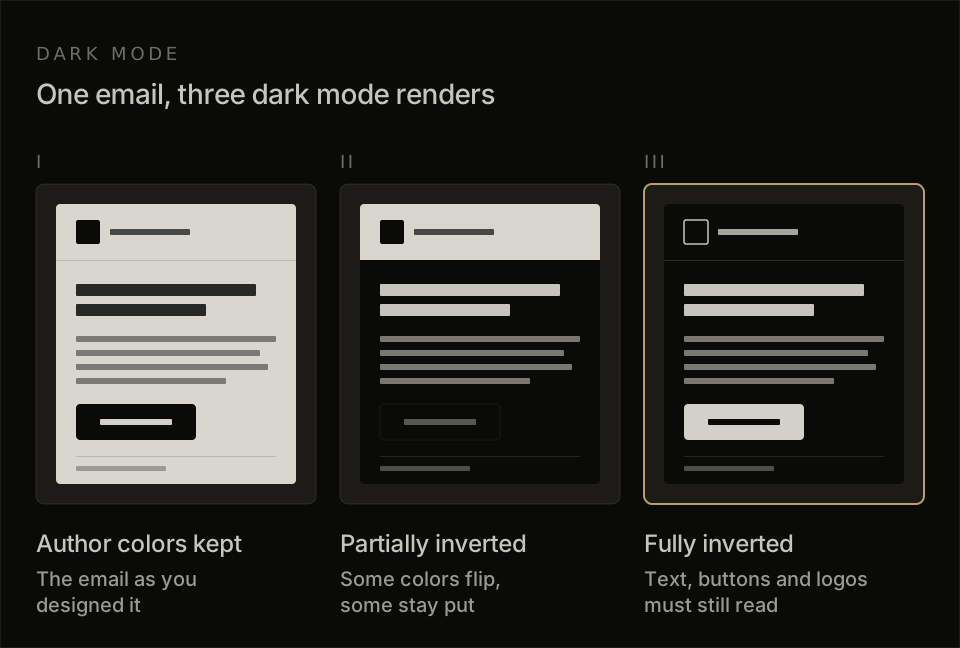
The reason this needs a real preview is that dark mode email does not render one consistent way. Clients tend to do one of three things: keep author colors, partially invert them, or fully invert lighter areas, so the same message can look fine in Apple Mail and drift in Gmail or Outlook.com.
For import review, use this tight pass list:
- Text remains readable against the background.
- CTA buttons keep enough contrast to look clickable.
- Logos and icons stay visible, usually with transparent PNGs or a light stroke around dark marks.
- Reversed sections, borders, and dividers still separate content clearly.
Outlook gets its own check because Outlook email rendering runs through Word’s engine. The pass condition is that the layout, spacing, and buttons still read as one clean email in Outlook preview, with no collapsed sections, odd font fallback, or shaky alignment.
CAN-SPAM postal address and unsubscribe
The footer passes when it shows a visible unsubscribe link and a physical mailing address. Those two elements are mandatory, and they should appear as normal footer content the reader can see and use.
In production terms, the exact token depends on the ESP. Universal uses [UNSUBSCRIBE_URL], MailerLite uses {$unsubscribe}, and ActiveCampaign uses %UNSUBSCRIBELINK% together with %SENDER-INFO% or %SENDER-INFO-SINGLELINE%, which gives full footer control when both are present.
Before import, confirm these two points:
- The unsubscribe link is visible in the footer and styled like a live link.
- The physical postal address is present in the footer content or injected through the sender-info block.
That final footer check supports email deliverability as much as compliance. One clean legal block, visible in preview, beats fixing the send after the campaign is already inside the platform.
Get the campaign into your ESP
There are two clean handoff routes: ESP HTML import for a finished template, or a Claude Klaviyo connector for campaign drafting inside the platform. For most teams, the better path is still verified HTML first, then import, because EmailTemple exports the template and the ESP sends it.
Custom HTML import
Most major ESPs support ESP HTML import, so once the email is verified, the next step is usually straightforward. Klaviyo is the most permissive version of that flow we’ve mapped: it accepts a full standalone HTML document through Content > Templates > Email templates > Import as a .html file, with no documented size cap or plan gate.
The part that blocks people is usually simple: they have the design, but they’re unsure which Klaviyo tags belong in the file. In practice, the key rules are clear. The upload must include an unsubscribe tag; Klaviyo enforces that at import, and the file should contain only Klaviyo tags, so your HTML needs Klaviyo syntax in the merge fields and footer.
Klaviyo also supports image references in two practical ways. You can upload a zip with image filenames, and Klaviyo will rehost and rewrite those references to its CDN, or you can use absolute external image URLs directly. That makes ESP HTML import a good fit when the email already exists as a designed, checked HTML file and just needs to land in the sending platform cleanly.
Drafting through a Claude connector
A Claude Klaviyo connector is useful when you want Claude working inside live campaign context, especially for drafting and analysis. Klaviyo offers a listed connector in Claude through Settings > Connectors > Browse Connectors, plus MCP server options for teams, and Klaviyo’s own examples include drafting a new email campaign for a segment such as VIP customers.
What that Claude Klaviyo connector gives you is campaign drafting, flow analysis, reporting, and profile insights through natural-language prompts. It can also pull performance stats and campaign data in plain English, which is useful when you want fast answers from the account itself. The practical split is simple: Claude helps prepare the campaign, EmailTemple exports the production-ready template, and the ESP handles the actual send.
What not to hand to Claude on autopilot
Claude can draft a marketing email workflow, but the send decision stays with a human, and that is the correct boundary. In practice, a Claude Klaviyo connector works best as a drafting layer inside the ESP: it can help shape segments, copy, and campaign setup, while approval stays in the platform before anything goes live.
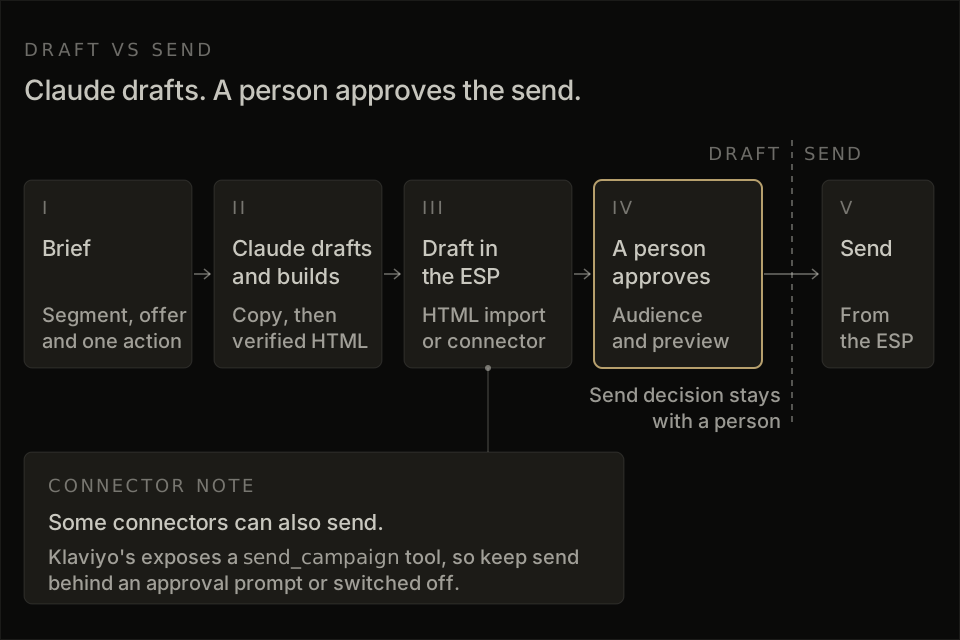
The two guardrails are simple. First, some connectors can send as well as draft (Klaviyo’s exposes a send_campaign tool), so keep send actions behind an approval prompt or switched off, and use read-only mode for sessions that only need to read lists, segment logic and campaign stats. Second, treat every output as an email review step before launch: check the final preview, restate the segment in plain English, and confirm the audience count makes sense, especially on personalized campaigns where one wrong condition can widen the send fast.
From one campaign to a repeatable system
The repeatable version is simple: brief the campaign, draft and tighten the copy in Claude, build the HTML, verify the render and compliance details, then move the finished email into your ESP for final review and send. That sequence turns one-off prompting into a Claude email campaign workflow you can run again with the same standards, which is where Claude starts saving real time.
For the broader AI email playbook, see How to Use AI for Email Marketing: A Practical Guide, which covers strategy beyond Claude. And if you want the whole job run linted in one pass, the Claude email marketing skill is the clean way to take a campaign from brief to a portable, dark-mode-safe export. If you want to try that path, generate your branded template for free.
Frequently asked questions
Can Claude send marketing emails on its own?
Claude can draft marketing emails and, through connectors, help create work inside an ESP, but the final campaign send belongs in the ESP with a person approving it. That matters because audience selection, consent, unsubscribe handling, and segment conditions need a final human check before anything goes out.
In practice, the clean workflow is simple: Claude builds the draft, the connector creates the draft where supported, and the ESP handles the actual send. Klaviyo’s connector can send if you let it, so keep that action behind an approval prompt and make the final send from inside Klaviyo.
Is Claude or ChatGPT better for email marketing?
For email copy, both Claude and ChatGPT are capable, and the brief usually matters more than the model. If the job is writing subject lines, shaping an offer, or tightening a campaign draft, either can get you close fast.
For HTML, both still need inbox testing before use. The current evidence supports a practical rule: use either model for drafting, then verify the build in real inboxes before import and send. Once the draft is ready, paste the markup into a free HTML email tester that scores clipping, Outlook width, inline CSS, and alt text in your browser before you import.
Why does Claude’s email HTML break in Outlook?
Claude’s email HTML breaks in Outlook because Outlook email rendering still turns small HTML and CSS choices into visible layout problems. A build that looks clean in Claude can shift fonts, spacing, buttons, or table structure once Outlook processes it.
That is why table-based structure, careful spacing, and real preview testing matter so much. Generic web-style HTML is where most breakage starts, especially when the model mixes patterns that modern browsers accept more easily than Outlook does.
Do I need a paid email-verification tool for automated sends?
Automated sending works best with an explicit deliverability check before the send is approved. At real outreach or campaign volume, stronger verification coverage can make the process more dependable, especially when a free tier only covers a small slice of the list.
The useful rule is simple: validate the audience before the send, not after the metrics dip. If your automation touches larger segments or frequent sends, a paid verification tier can be the cleaner fit.
Which ESP connects best to Claude?
The best ESP for Claude is still an open question, because the value depends on whether you want drafting help, HTML import, or tighter campaign workflow inside the platform. In practice, Klaviyo comes up often because its import flow is permissive enough for custom email builds, and the Claude Klaviyo connector is part of that discussion for teams drafting closer to send time.
A good way to judge it is by the handoff you want. If you already have verified HTML, smooth custom import matters most; if you want Claude involved inside the campaign workflow, connector support and draft handling matter more.
Can Claude replace an email marketer for a small business?
Claude can cover a big share of the production work for a small business, especially drafting, refining, and preparing campaigns for review. It can speed up copy, generate drafts fast, and help turn a rough idea into something send-ready inside the workflow.
A person still owns the strategy, the audience, and the send decision. For a business that currently sends very little, Claude can move the channel forward quickly; for a business that needs someone accountable for revenue and list health, an email marketer still has a clear job.
